https://wiki.firstbit.ae/spaces/Con/pages/296422419/3.4.3.+Project+Cost+Markups
Page should contain 3 main paragraphs: Description (what is this report used for, which documents reflect report values(Project Estimates)), Structure, screenshot with data (what data it contains by lines and columns), Filters and parameters, screenshot with quick settings panel (what default settings are available under quick setting panel).
While describing structure we need to describe each element in the report header.
Structure screenshot need to show data for each level of report structure.
Need to explain that resource level can be shown only for manpower or fixed assets type of expenses. And it can be exact employee or Fixed asset if it used while project estimation.
Description
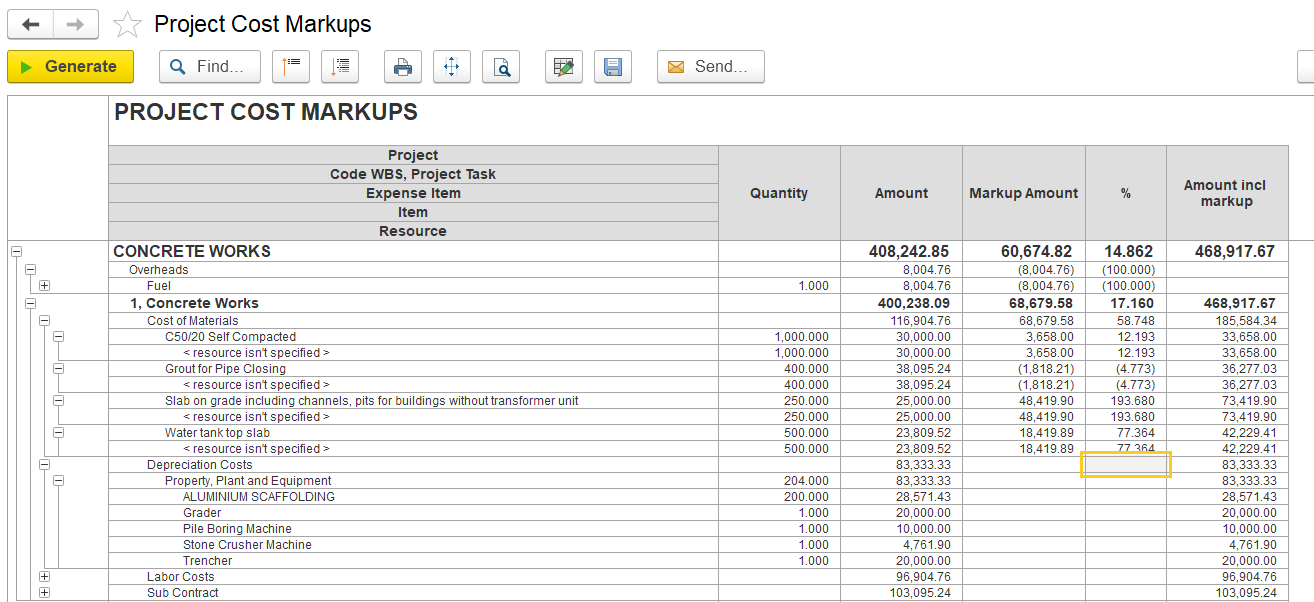
The Project Cost Markups report is used to analyze project costs and apply markup percentages to calculate the final selling price or invoice value for each task, material, or resource.
Structure
Project – Main project name. Example: Al Hamra Falcon Island – Al Hamra Homes, RAK
Code WBS / Project Task – Work Breakdown Structure code and phase/task.
Expense Item – Cost categories like Equipment, Labor, Overheads, etc.
Item / Resource – The specific cost item or resource under each category.
Resource-level details are shown only for Manpower or Fixed Assets. If the project estimation included named resources, the report will display the exact employee (for manpower) or the specific fixed asset used.
Quantity – Planned quantity (if applicable).
Amount – Original base amount of cost (without markup).
Markup Amount – Profit amount added over base cost.
% – Markup percentage applied to base cost.
Amount incl. markup – Final cost after markup (Amount + Markup Amount).