...
When the depreciation amount is manually changed for a specific month.
1. The adjustment affects only that accounting period. The system does not automatically recalculate depreciation amounts for future periods.
In February, the user manually changes the depreciation amount in the Fixed Asset Depreciation document from the calculated amount of 1,666.67 to 2,000.00. As a result, February depreciation is recorded as 2,000.00 instead of 1,666.67.
- The adjustment affects only that accounting period. The system does not automatically recalculate depreciation amounts for future periods.
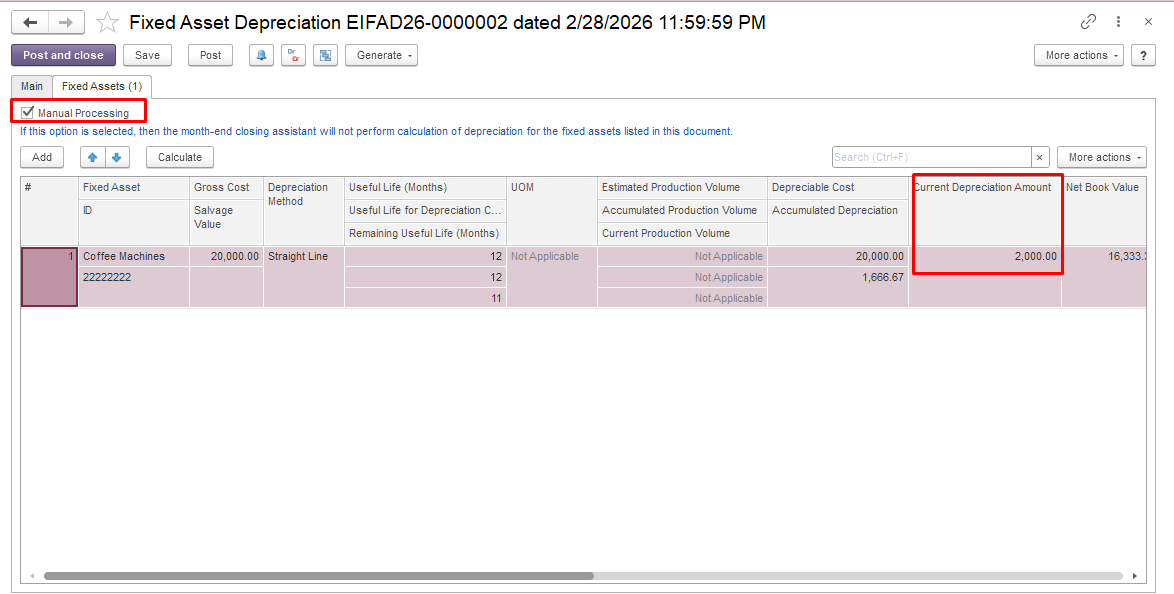
In March, the system calculates depreciation during the Month-End Closing procedure based on the original fixed asset parameters, and the depreciation amount is 1,666.67.
- the manually adjusted amount is not restored or compensated in subsequent months;
- future depreciation continues to be calculated according to the asset's depreciation parameters, taking into account the updated accumulated depreciation and remaining book value.
Example
Initial data
- Asset cost: 20,000
- Useful life: 12 months
- Monthly depreciation: 1,666.67
October
The user manually changes the depreciation amount from 1,666.67 to 0.00 in the Month-End Closing document and posts the document.
Result
- October depreciation = 0.00
- The accumulated depreciation is lower than originally calculated.
November and subsequent months
...