...
- Apply Retention withholds a portion of the payment as specified by the contract, and Ret. VAT at Retention Invoice applies VAT to the retention amount when the retention invoice is issued. Both options are set based on the selected contract and are non-editable from the document.
- Entity - The legal party that issues the payment certificate
- Basis - Indicates whether the certificate is generated was generated from a Payment Application or created manually for progress.
- The Progress / Advance selector allows the user to define the purpose of the certificate-.
a) Progress- For certifications tied to actual work completed.
...
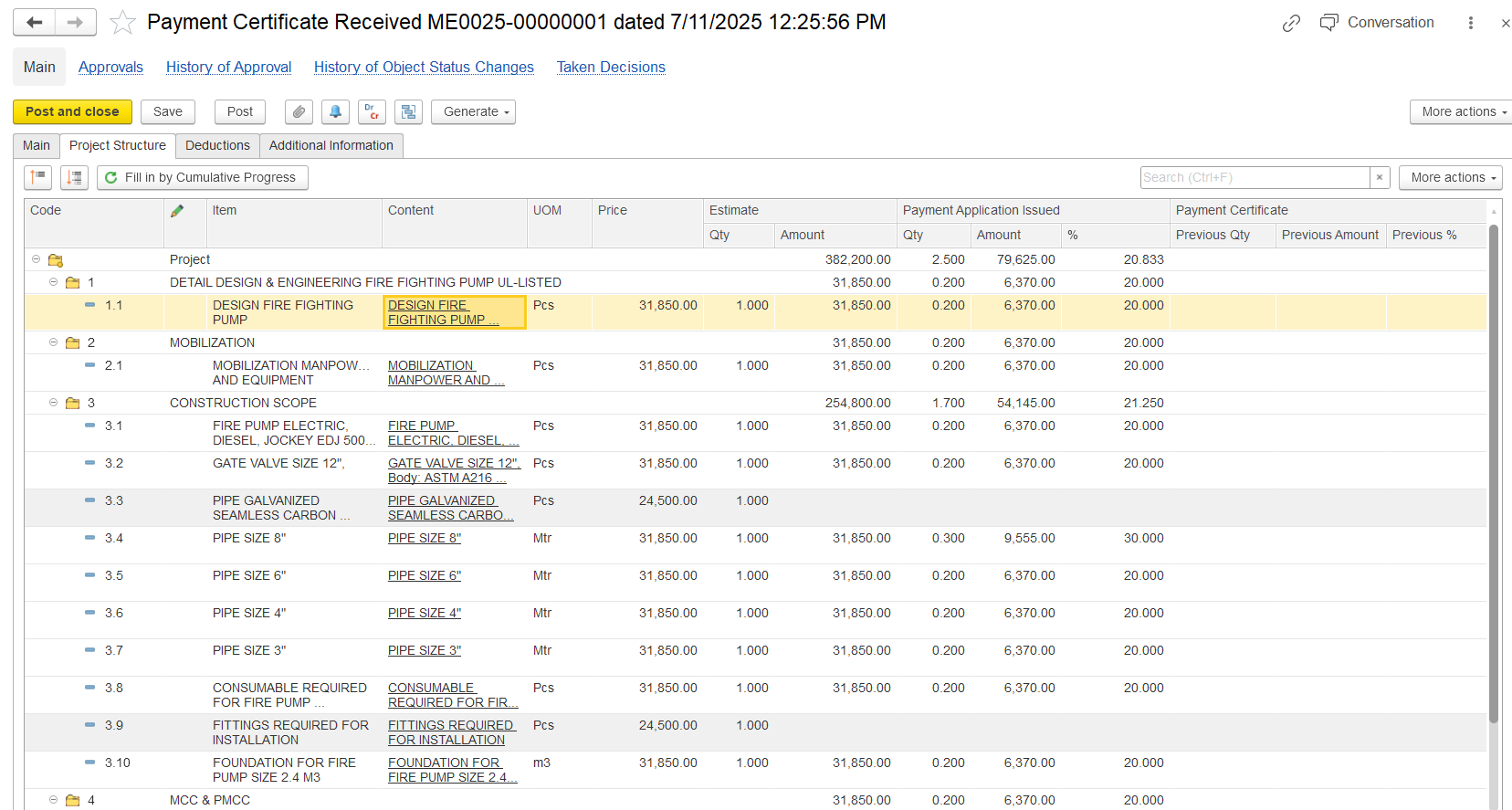
- Code- BOQ or WBS code identifying each work item in the project structure.
- Item / Content- Description of the service or work item selected for certification.
- UOM (Unit of Measure)- Unit in which the work is measured (e.g., Pcs, Mtr, m³).
- Price- Unit rate as per the contract or BOQ.
- Estimate Qty / Amount- Planned quantity and total planned amount for the item (Quantity × Price).
- Payment Application Issued - Qty / Amount / %- Shows the quantity, value, and progress percentage already applied for in submitted payment applications.
- Payment Certificate - Previous Qty / Amount / %- Displays the quantity, value, and percentage that were certified in earlier Payment Certificates.
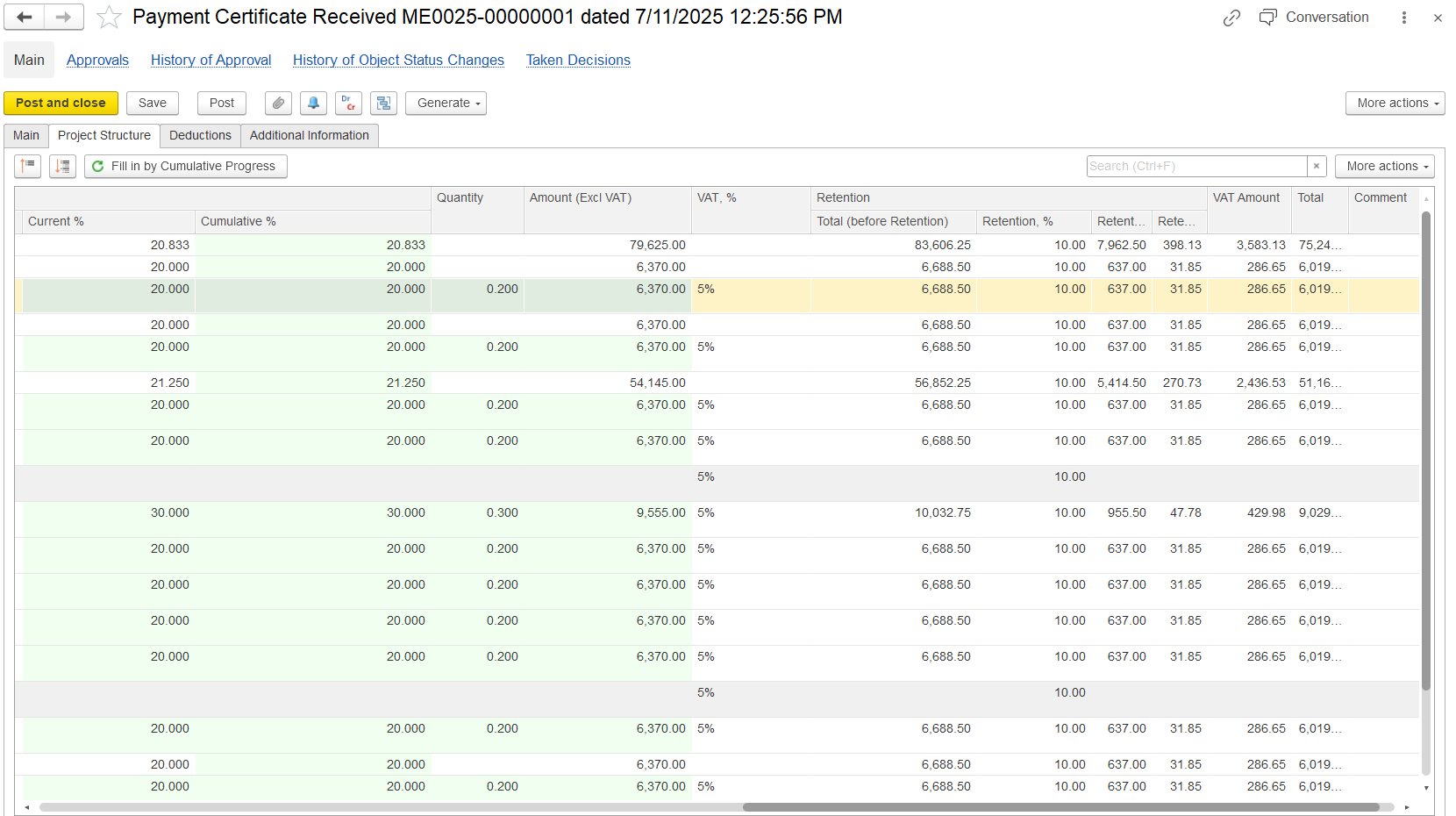
- Current%- Progress is certified in the current period onlythis document.
- Cumulative%- Total progress certified to date.
- Quantity- Quantity of work certified in this certificate.
- Amount (Excl. VAT)- Certified amount excluding VAT.
- VAT%- VAT rate applied (e.g., 5%).
- Retention Total (before retention)- Total amount before applying retention.
- Retention% / Amount- Retention percentage and corresponding deduction.
- VAT Amount- VAT value calculated on the amount.
- Total- Final amount payable (including VAT, after retention).
- Comment- Optional notes for clarification or remarks.
Summary Tab
This tab provides a consolidated, read-only view of certification vs application. It’s not editable but is critical for validation. Here’s what it shows-At the bottom of the Project Structure tab, a financial summary shows key certified values for the certificate. This table is linked to the selected parent line, so it only shows related details.
- Project Details- Displays the associated project, WBS, and task from the related service lines.
- Item and UOM Info- Shows the service item, content/description, and unit of measure.
- BOQ Values- Displays the baseline BOQ estimated amount and quantity for reference.
- Progress Snapshot- Compares progress in percentage and quantity across different periods.
- Application vs Certified- Highlights how much has been applied (from PA) vs how much has been certified (in this document).
- Cumulative Recalculation- Automatically adjusts certified values if the linked Payment Application changes.
- Purpose- Allows users to see the cumulative and current period metrics in one place, enabling audit, control, and reconciliation across documents.
...
- Bank Account- Specifies where the payment should be transferred.
- Additional Data For Print- Displays custom or extra info on printed forms.
- Ref. Doc. #- Links to related supporting documents.
- Terms and Conditions- States any special agreement clauses.
- Responsible - Person Person accountable for the document or process.
...
Advance invoice type
When the Advance option is selected, an Advance tab appears. This indicates that means the certificate is for requesting or recording an advance payment, not for recording used to confirm the conditions for issuing an advance invoice and to register the advance payment, rather than to record actual work progress.
The Prepayment tab will not appear because this document itself is the advance.
...