...
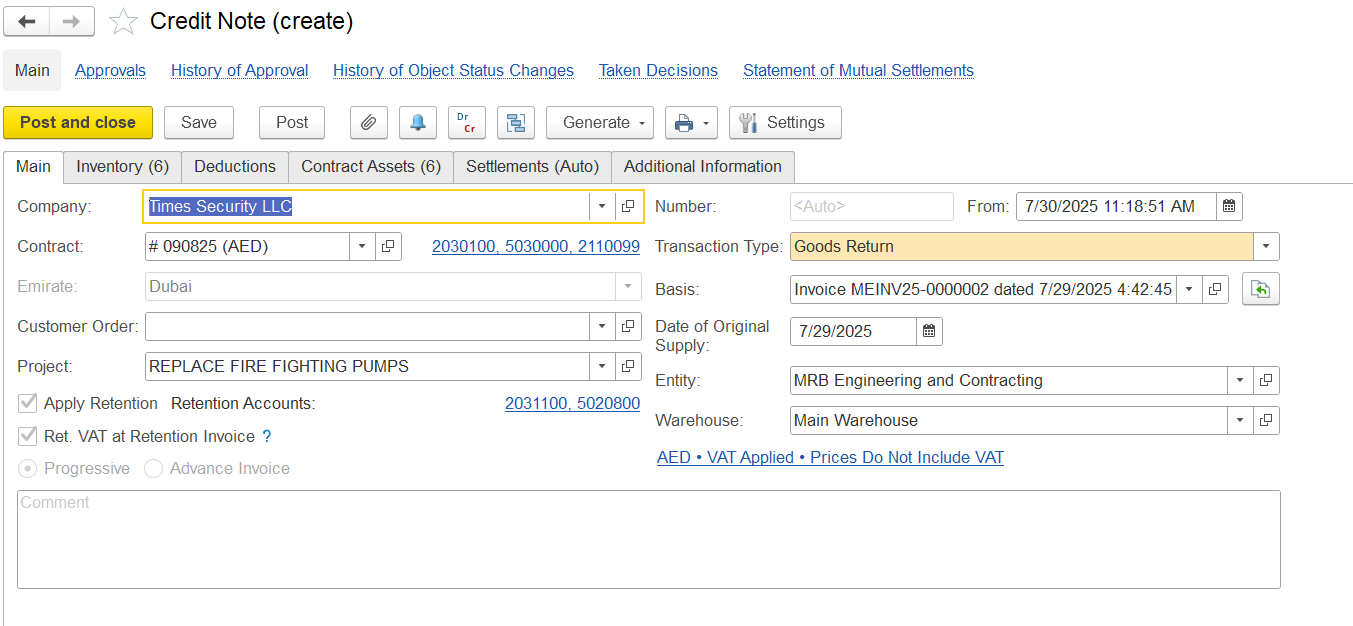
Company Name - The company or client for whom the credit note is created
- Contract - Refers to the agreement associated with the transaction.
- Emirate - Indicates the emirate where the transaction was carried out.
- Customer Order - Represents the client’s order linked to this credit note.
- Project - Specifies the project or job connected to the transaction.
- Apply Retention / Ret. VAT at Retention Invoice - Indicates if retention should be applied (as defined in the contract) and specifies how VAT is handled for retention-related invoices
- Progressive / Advance Invoice - Indicates whether the credit note is linked to progressive billing or related to a previously issued advance invoice.
- Comment - A field used for entering internal comments or notes.
Transaction Type describes the kind of credit note being created. For adjusting progressive invoices, you can use:
Goods Return: Used when physical items or materials are being returned. This affects inventory and contract assets.
Invoice Correction: Used when correcting amounts or quantities without returning items, such as fixing errors or updating values. This mainly affects financial records, not inventory.
- Basis - Indicates the original invoice that the credit note is reversing.
- Date of Original Supply - The date when the original goods or services were provided.
- Entity Name - The legal entity that issues the credit note
- Warehouse - The location of the inventory involved, if applicable.
Inventory tab
The Inventory Tab records and adjusts credited items and their financial details in the credit note.
- Item Description - Name of the returned or reversed item
Quantity-Number of units being credited back.
Unit Price-Price per unit before any deductions.
Amount-Total value for the line (Quantity × Unit Price).
VAT (%)-The VAT rate applied to the item.
VAT Amount- The VAT calculated on the item value.
Total Before Retention-The sum of the item amount plus VAT, before deducting any retention.
Retention-Amount withheld according to the project's retention rules.
Retention VAT-VAT amount related to the retention deduction.
Net Total-The final credited amount after retention and VAT on retention are deducted.
Contract Asset Quantity-Portion of the item quantity being reversed from the contract asset records.
Amount (Contract Asset)-The value reversed from the contract asset, calculated by multiplying the unit price by the contract asset quantity.
Note: These fields auto-fill when you click “Fill Contract Assets” in the Contract Asset tab.Income Account-The account where the original revenue from this item was recorded.
Business Activity-The reporting category this item belongs to (e.g., Main Activity).
Project Task / WBS-Links the item to a specific project task or work breakdown structure segment.
...