Adding a Project: The Main Parameters Tab
This tab contains the main information related to the project, including the entity, customer, project manager, and planned start and finish dates. As the project progresses through its life cycle, actual start and finish dates can also be entered.
The required fields are: Description and Entity
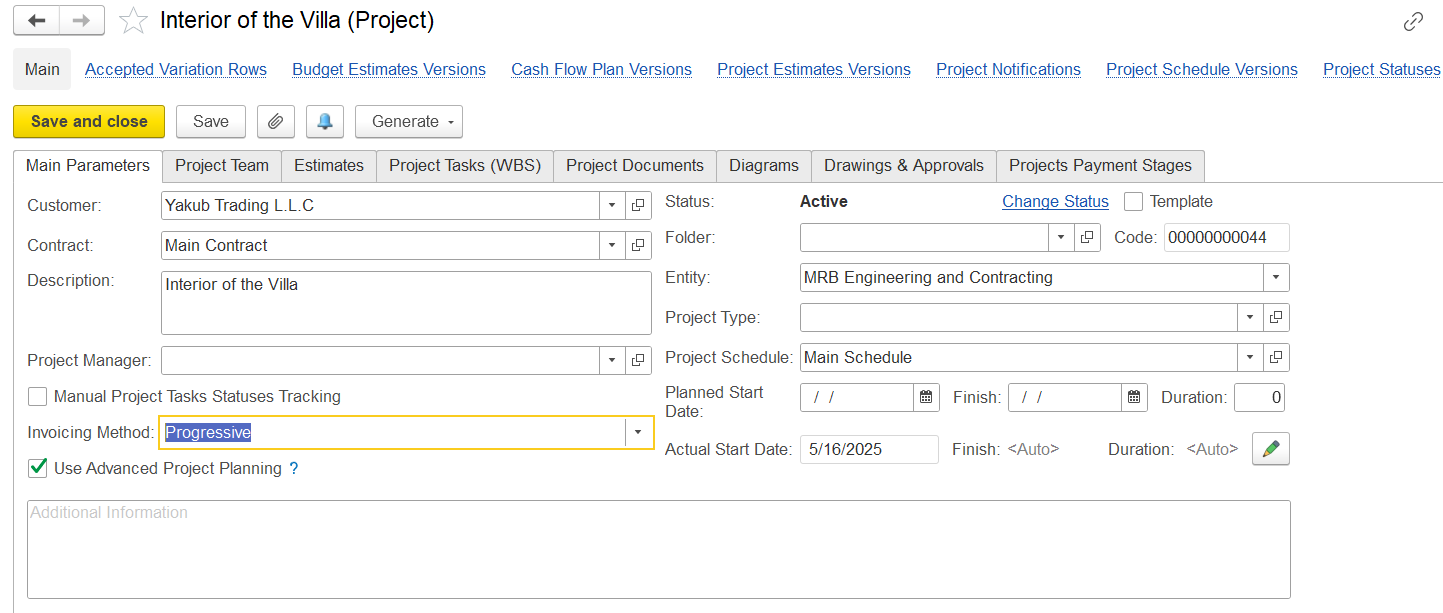
Main Parameters Tab – Field Details
This tab contains key project attributes that define the structure and initial setup of the project.
...
After filling out the tab, click the Save button to save the project. Click Save and close to save the project with all the changes and close the form.
Project Status Changes
You can change the project status by using the Change status link to the right of the current project status. The link appears once you save the project.
...
Then, click Save to assign the selected new status.
Available links
The following links are available at the top of the form under the project title:
...