Description
A Subcontractor Agreement Report gives a clear summary of a subcontractor’s financial and work progress details. It helps reconcile the subcontractor’s contract, completed work, and financial records. The report is mainly used by finance, project control, and audit teams to verify-
Contract quantities and values
Work progress versus agreed scope
Retention and VAT computations
Consistency between certified work and invoiced amounts
Structure
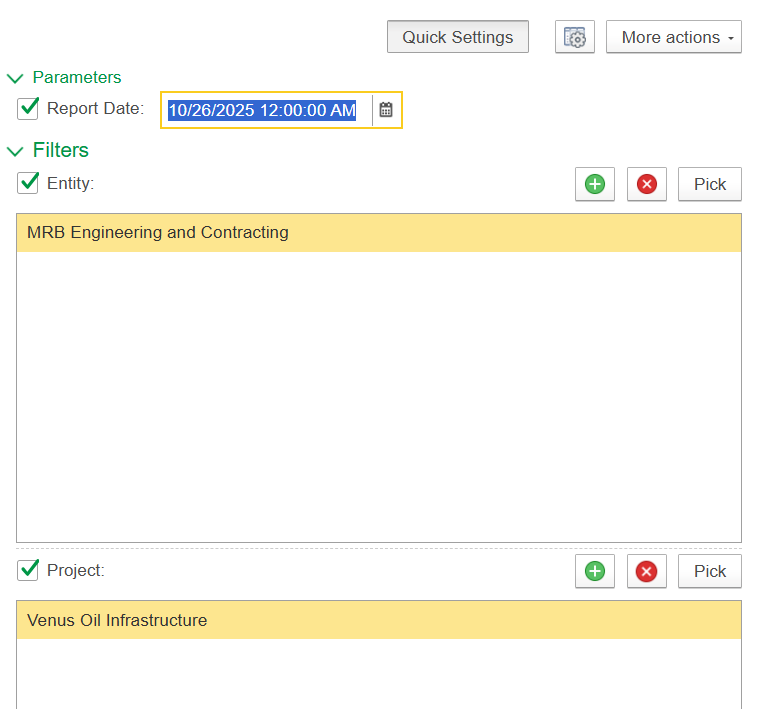
Generate - Executes the report based on the selected filters or parameters.
Find- Allows users to search within the report for specific text or values.
Collapse/Expand Groups - Show or hide grouped sections in the report.
Print Button- Opens a print preview or directly sends the report to a printer.
Fit to Screen/Zoom Button- Adjusts the report layout to fit within the screen or zooms into specific areas.
Search Button (Magnifying Glass)- An alternate or advanced search tool for locating specific records or entries.
Edit Mode Button- Enables editing mode for the report or screen.
Save disk- Allows formatting or exporting options to be saved to the desk as per required formats, such as to Excel or PDF.
Send- Used to email or forward the report directly to another user or contact.

Columns
Project - Identifies the project under which the subcontract is executed.
Subcontractor - Specifies the contractor responsible for executing the work.
Contract - The contract linked to the subcontractor agreement.
- Subcontractor agreement - Refers to the formal document agreement with the subcontractor.
- Subcontractors WBS - Work Breakdown Structure assigned to the subcontractor.
- Agreement
- Qty - Quantity of work or material defined in the agreement.
- Amount (Cur) - Gross contractual value before applying any deductions.
- Discount Amount (Cur) - Commercial discount, if any, agreed on the gross amount.
- Payment Application-
- Quantity - Quantity of work claimed in this payment period
- Amount (Cur) - Value after applying discount; used as the base for VAT and retention.
- VAT (Cur) - Value-added tax calculated on the net amount.
- Retention (Cur) - Portion of the net amount withheld as a performance or quality guarantee.
- Retention VAT (Cur) - VAT amount applicable to the retained portion.
- Progress % - Percentage of work completed for each line item, based on certified quantities.
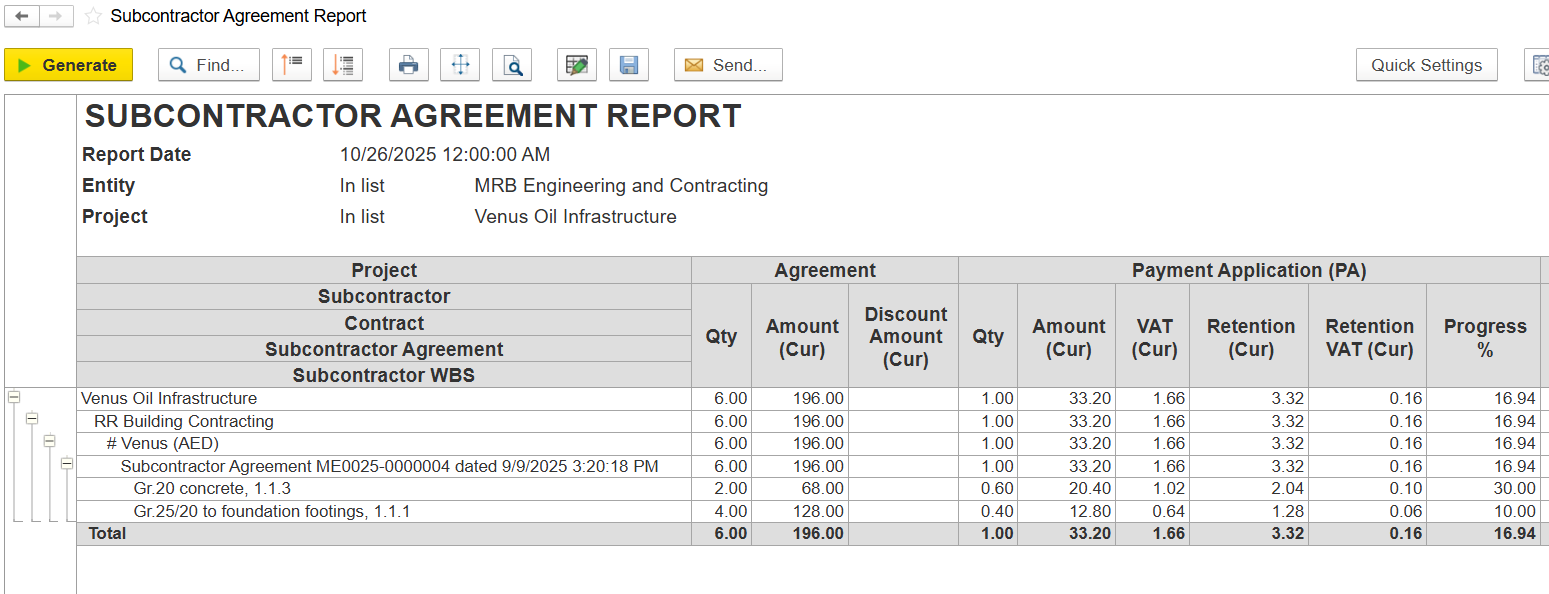
- Payment Certificate (PC)
- Qty - Amount of work certified for this payment.
- Amount (Cur) - Contractual value of the certified work.
- VAT (Current) - VAT on the certified work for this period.
- Retained - Portion of the certified amount held back (retention).
- Retention VAT (Cur) - VAT on the retained amount.
- Progress % - % of total project/work approved so far.
- Invoiced
- Qty - Quantity invoiced by the subcontractor.
- Amount (Cur) - Amount invoiced, excluding VAT.
- VAT (Current) - VAT on the invoiced amount.
- Retention (Cur) - Retention deducted from the invoice.
- Retention VAT (Cur) - VAT on the retention amount.
- Progress % - % of total contract value invoiced to date.
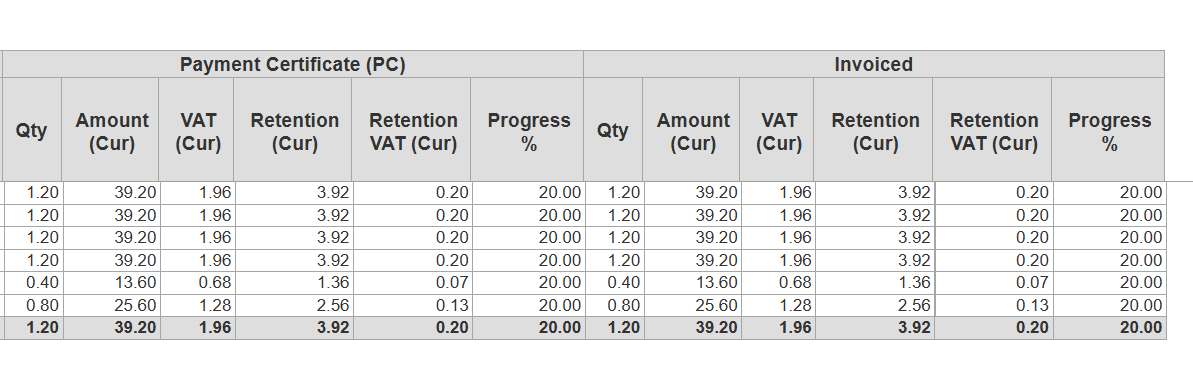
Filters and Parameters
Report date - Select on date of the report
Entity - Selects a specific legal entity or company unit; the report shows data for the chosen entity only.
Project - Filters the report to a selected project