The Debit Note is a document issued by a supplier or subcontractor to revise or correct previously issued invoices. It allows correction of overcharges, service deductions, retention adjustments, or settlement entries related to supplier invoices.
This document ensures that supplier liabilities reflect the correct payable amount after any post-invoice corrections.
- Goods Return- For returning physical items.
- Item- for each entry in the transaction.???
- deduction tab description is strange. debit note is used to adjust deductions values made in invoice received.
How to create
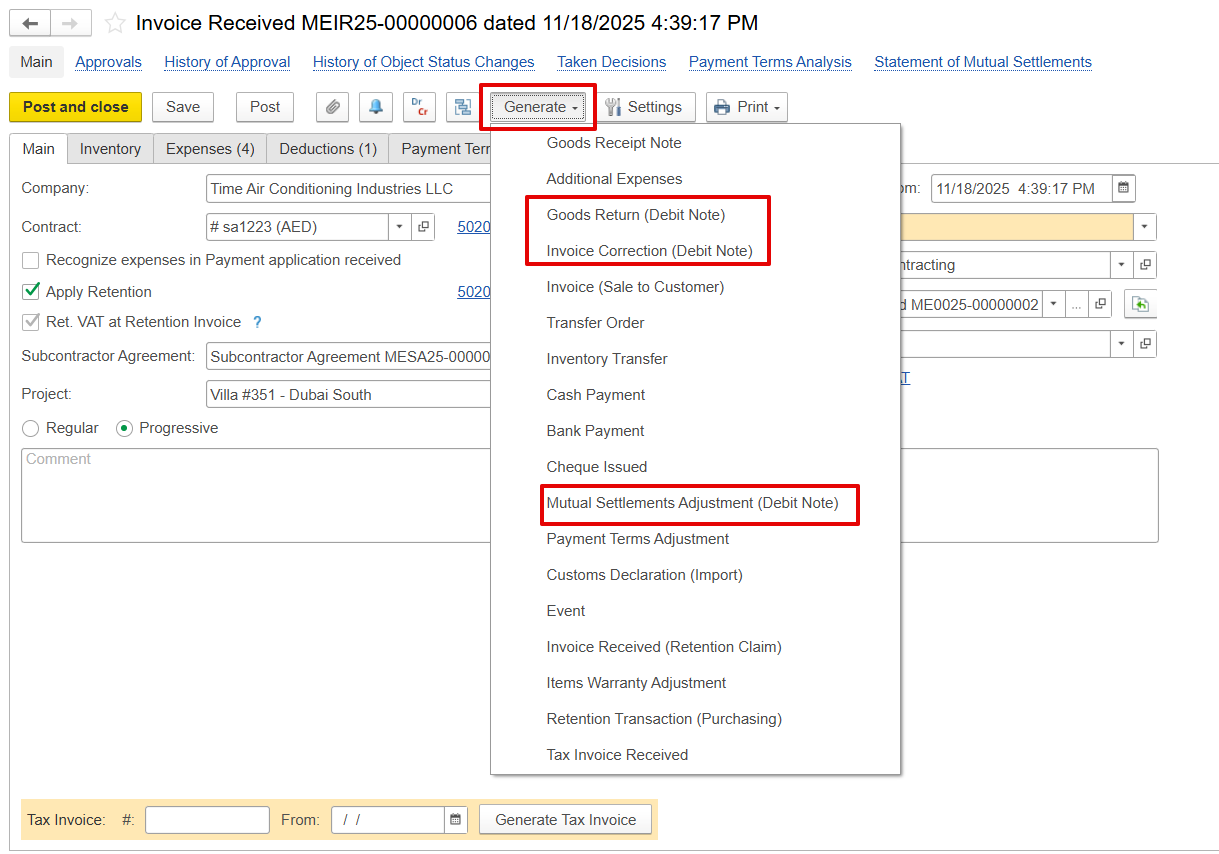
The debit note can be created using the Generate option from the related Invoice Received document, with all required details automatically populated
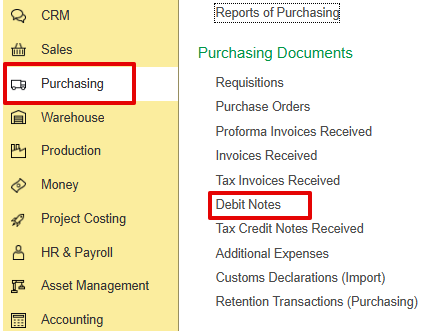
Alternatively, it can be created from the Purchasing module
Purchasing → Purchasing Documents → Debit Notes.
Main Tab
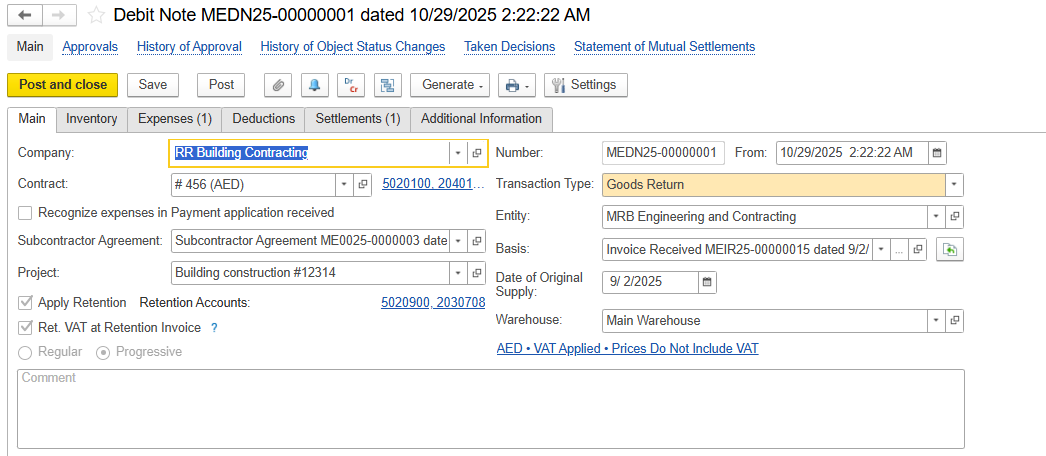
The Main Tab captures the essential details that identify and control how the Debit note is processed.
Company Name- Client or company for whom the debit note is created.
Contract- Contract linked to the transaction.
Recognize Expenses in Payment Application Received- If already enabled in Invoice received, it will be automatically enabled in debit note.
Subcontractor Agreement- Links the debit note to a subcontractor agreement.
Transaction Type- Purpose of the debit note:
Goods Return- For returning physical items or return transactions for services.
Invoice Correction- To correct amounts/quantities without returning items.
Project-Project associated with the transaction.
Apply Retention / Ret. VAT at Retention Invoice-Apply retention and retention VAT rules as per the contract.
Basis-Original invoice received is being reversed or adjusted.
Date of Original Supply-Date when the original goods/services were supplied.
Entity Name-Legal entity issuing the debit note.
Warehouse-Inventory location involved (if applicable).
Comment-Internal notes or remarks.
Expense Tab
Item- for each entry in the transaction.
Content-Describes the work or service performed, often linked to WBS.
Quantity (UOM)-Number of units involved, with unit of measure.
Price-Unit price for the item or service.
Discount %-Percentage discount applied to the item, if any.
Discount-Amount of discount applied.
Amount-Total value before VAT and retention; calculated as Quantity × Price minus Discount.
VAT% -Applicable VAT rate for the item.
Total (before Retention)-Total amount including VAT, before applying retention.
Retention-Percentage of the amount withheld as retention, based on contract terms.
Retention VAT-VAT component of the retention withheld.
- VAT Amount-Monetary value of VAT for the item.
- Total-Net payable amount after applying VAT and retention.
Project Task-Specific task or activity within the project that this item relates to.
Project WBS-Work Breakdown Structure code linking the item to a project task or subtask.

Subcontract WBS-Code that links the expense to the subcontractor’s part of the project for tracking costs.
Department-The internal department responsible for the expense, usually shown with code and name.
Expense Item- The type of cost or GL account used to classify the expense.
Business Activity-The area of work the expense relates to, such as subcontracting, procurement, or internal services.
Customer Order-Links the expense to the client’s order or deliverable that it supports.
Cost Object-Optional field to connect the expense to a cost center, asset, or internal tracking unit.
Comments-Notes or references for internal use, documentation, or audits.

Deduction tab
A debit note is issued to revise or adjust the deduction amounts applied to a received invoice.
Item- Name of the item.
Content- Brief description of the item name.
Quantity- Number of units being debited or deducted.
UOM (Unit of Measure)- The unit used to measure the quantity.
Price- Price per unit of the item.
VAT %- VAT rate applied to this item.
VAT Amount- VAT calculated based on the price and quantity.
Deduction Amount- Total value of the deduction before VAT (Quantity × Price).

Settlements
This tab shows how the debit note amount is automatically applied or settled against related payments and documents:
Advance-Indicates if the debit note adjusts a previously made advance payment.
Is Deductions- Shows amounts from earlier deductions (like penalties or withholding) included in this debit note.
Document- The original invoice or document linked to this debit note.
Purchase Order-Reference to the purchase order tied to the original invoice or transaction.
Amount- The debited amount related to the original document.
Accounts Payable GL Accounts-General ledger accounts affected by the debited amount.

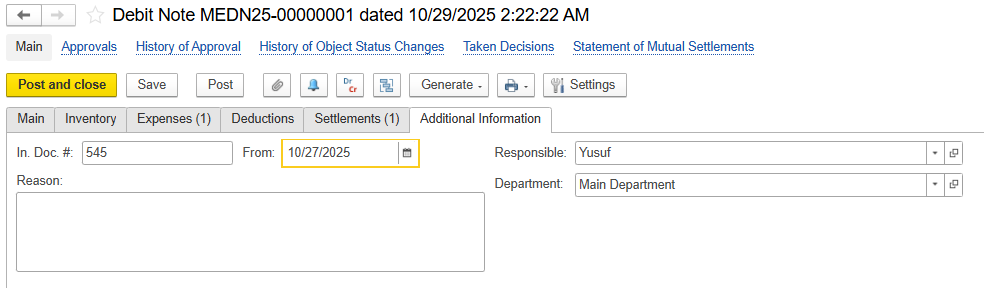
Additional Information tab
In. Doc#- Unique reference number for the debit note.
From Date- Date when the debit note is issued.
Department- Internal division issuing the debit note.
Responsible- Employee responsible for the transaction.
Reason-Explains the reason or justification for issuing the debit note.