AI CASE 10. Bank Payment for Loan Principal Repayment Cannot Be Posted
1. User Question
There is an outstanding balance on a loan received. The company repaid partially amount of Principal. When I try to post the bank payment, the system shows an error. What could be the problem?
2. Problem / Symptom
When posting a Bank Payment with the Transaction Type Repayment of Loan Received (Payment Type Principal), the system displays the following error:
Error:
The remaining principal amount is less than the current principal amount in this document.
Loan Agreement: # Loan agreement <number of Loan agreement> from <date of Loan agreement> ,
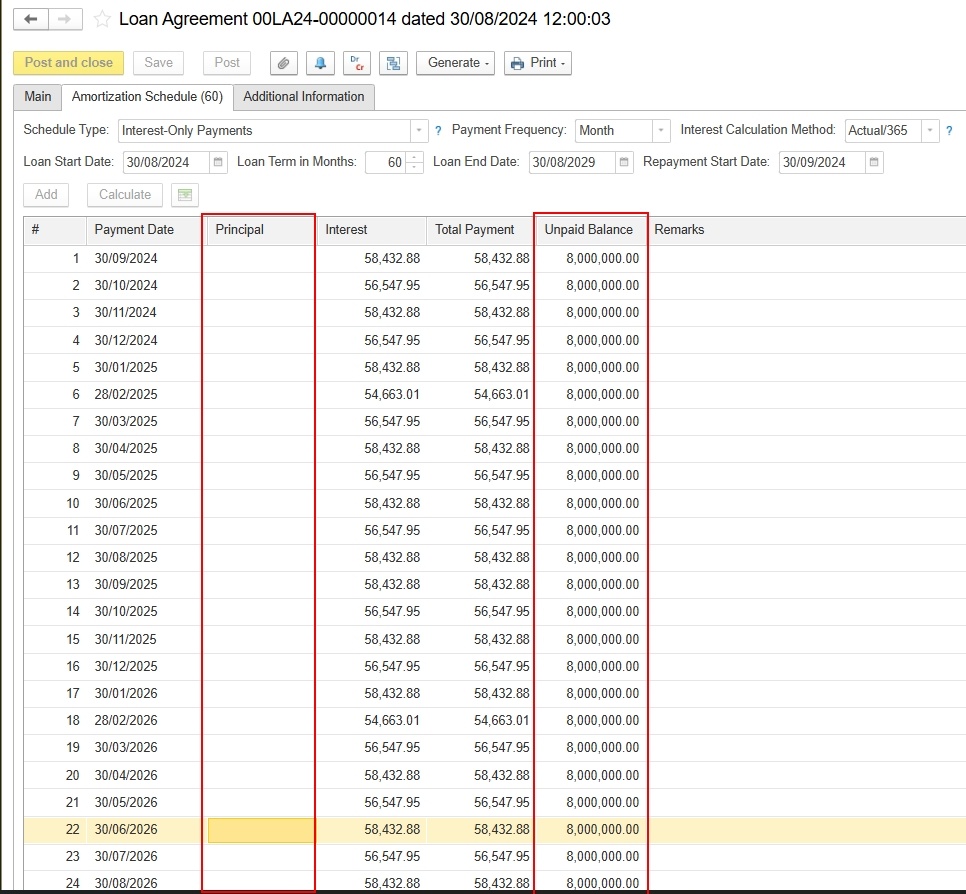
At the same time, the Unpaid Balance column on the Amortization Schedule tab of the Loan Agreement shows amount which gives the impression that the principal balance is already recorded in the system. But Column Principal is empty.
3. Conditions
- Loan Agreement : Schedule Type = Interest-Only Payments, Payment Frequency = Month, Interest Calculation Method = Actual/365, term of 60 months.
- Interest is accrued using Processing of Current Loans documents; the Loans Received report shows accrued interest.
- The receipt of the loan funds is not recorded with a Bank Receipt document with the Transaction Type Loan Received.
- A Bank Payment dated is created with the following settings:
- Transaction Type: Repayment of Loan Received;
- Basis: Loan Agreement;
- Amount:
- Payment Details tab: Payment Type = Principal, Payment Amount .
4. Root Cause
The database has no document recording the actual receipt of the loan (a Bank Receipt with the Transaction Type Loan Received). As a result, the principal balance for this loan agreement is zero in the system.
When a Bank Payment is posted, the system checks that the principal repayment amount does not exceed the remaining principal balance. Because the balance is zero, the repayment is treated as exceeding it, and the document cannot be posted.
The Unpaid Balance column on the Amortization Schedule tab is a planned value from the repayment schedule. It does not reflect the actual outstanding balance, which is formed only by cash movement documents.
5. Diagnostics
- Generate the Loans Received report filtered by the loan agreement, either without a period restriction or for a period that includes the loan receipt date.
- Check the Received Amount and Closing Balance → Principal columns. If they are empty while interest has been accrued, the loan receipt has not been recorded (screenshot 02-001: the Received Amount and Principal columns are empty and only interest is accrued).
- Check whether a Bank Receipt with the Transaction Type Loan Received exists with this loan agreement as its basis.
- Check which document was actually used to record the USD 8,000,000 inflow to the bank account (if it was recorded differently, see the risks under Resolution).
6. Resolution
The following was verified on a copy of the customer’s database:
- A Bank Receipt (00BR24-00000338 dated 30/08/2024) was created:
- Transaction Type: Loan Received;
- Lender: EMPYREAN HEAVY MACHINERY SPARE PARTS TRADING L.L.C;
- Basis: Loan Agreement 00LA24-00000014;
- Amount: USD 8,000,000.00 (Rate 3.6725);
- Bank Account: USD 0515672703602, in NBD.
- After it was posted, the principal balance appeared in the Loans Received report: Received Amount and Closing Balance → Principal = AED 29,380,000.00 (8,000,000 × 3.6725) (screenshot 02-003).
- The Bank Payment with the Transaction Type Repayment of Loan Received for USD 5,000,000.00 under this agreement was then posted without errors (tested on the copy with document 00BP29-00000001 dated 30/08/2029) (screenshot 02-004).
- After posting, the Loans Received report shows Paid Principal = AED 18,362,500.00 and Closing Balance → Principal = AED 11,017,500.00, which corresponds to the remaining balance of USD 3,000,000 (screenshot 02-005).
Recommendation for the customer: record the loan receipt with a Bank Receipt using the Transaction Type Loan Received and the actual date the funds were received. Then post the Bank Payment for the principal repayment with the actual payment date (19/06/2026).
Risks and limitations:
- If the USD 8,000,000 inflow has already been recorded in the database with another document or a different transaction type, creating a new Bank Receipt will duplicate the bank balance. In that case, correct the existing document (transaction type and basis) instead of creating a new one.
- If the loan was received before accounting started in this database, the method for entering the opening loan balance needs to be clarified separately.
7. Related Materials
- Screenshots from the customer’s question:
- 01-001: Loan Agreement, Amortization Schedule tab;
- 01-002: Bank Payment, Main tab;
- 01-003: Bank Payment, Payment Details tab with the error message.
- Screenshots from the resolution:
- 02-001: Loans Received report before the fix;
- 02-002: Bank Receipt with Loan Received;
- 02-003: report after the loan receipt;
- 02-004: posted Bank Payment;
- 02-005: report after the repayment.
8. Product / Configuration
- FirstBit ERP UAE (cloud database, web client).
- The configuration release and platform version are not specified in the request and need to be confirmed.
9. Functional Area / User Guide Section
- Finance → Loans Received (Loan Agreements, Loans Received report)
- Bank → Bank Receipt (Loan Received), Bank Payment (Repayment of Loan Received)
- Interest accrual: Processing of Current Loans