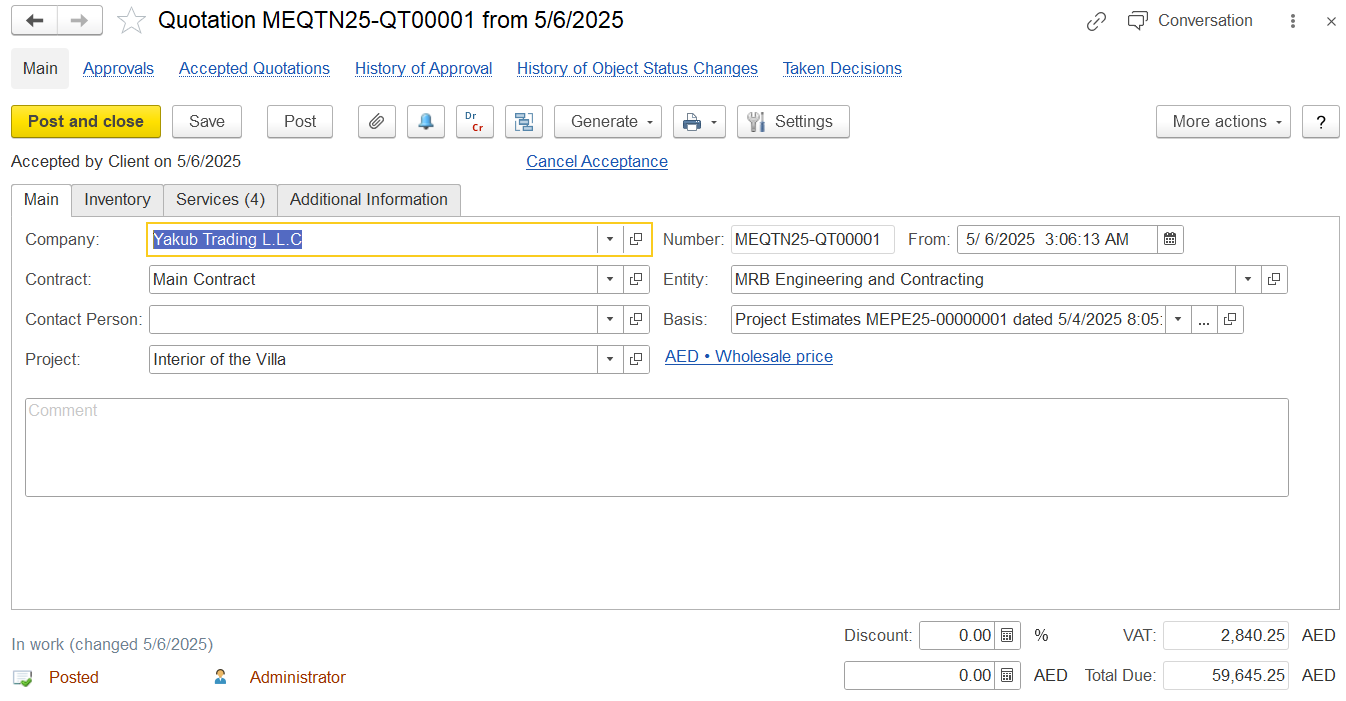
On this tab, enter general information about the quotation: the entity, customer, contract, and contact person.
Company, Contract, and Entity are mandatory fields.
Company – Select a customer (an individual or legal entity) from the Companies list for whom the quotation is being created.
Contract – Automatically populated with the default contract of the selected company. You can choose another contract or create a new one if needed.
Contact Person – Select the person from the customer side who is responsible for the potential deal.
Number – If set to <Auto>The number is assigned automatically when the document is saved. Can be manually edited if needed.
Entity – Select the legal entity responsible for the sale. This field is visible if Multi-Company Accounting is enabled in settings.
Basis – Select the project estimate or other source document that serves as the basis for this quotation.
Project – Allows linking the quotation to a project. If needed, the Project field can be shown as a column on the Inventory or Services tab using the Settings button.
Comment – Optional field for entering additional information related to the quotation.