This tool is intended for quick and easy tracking of leads (bid invitations).
Users can open Leads pipeline by navigating through CRM → Tools → Leads Pipeline.
Leads pipeline screen is divided into three main areas:
Command bar

- Create button - opens new lead registration screen.
- Refresh button - updates pipeline data.
- Responsible filter - filters pipeline data by selected employee, only leads with the selected responsible employee will be displayed.
- Company filter - filters pipeline data by selected Company, only leads with the selected company will be displayed.
- If both filters are applied, "AND" filter condition will be used in this case (the pipeline will display leads where the company is the company from the filter AND responsible is the employee selected in the filter).
Pipeline data
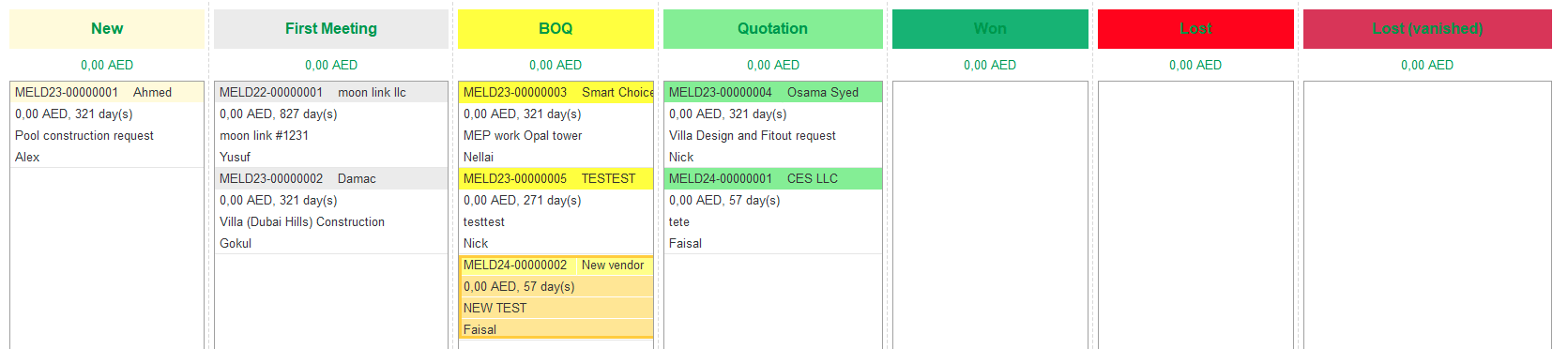
- Statuses - each column is a status from the list of custom Statuses for Leads. Admin users can create and adjust the list of statuses in the settings (Administration → CRM → Custom Statuses for Leads → Edit the list of Custom Statuses for Leads). Lead cards will be displayed under each status accordingly.
- Budget amount by status - under each status pipeline shows the sum of values mentioned in leads as a Budget.
- Lead cards - displayed main information about the lead, such as number, client, budget, responsible person, and duration of staying under the current status in days.
- Users can change lead status by drag and drop action between pipeline statuses.
Bottom drag and drop areas.

- Delete - drag and drop any lead card to this area to mark for deletion document. (Marked-for-deletion transactions will not be shown in the leads pipeline, but users still can see them in the Leads list. Transactions marked for deletion later can be deleted permanently only by admin user).
- Create project - drag and drop any lead card to this area to Create a new project reference for this lead.
- Close - drag and drop any lead card to this area to mark this Lead as Closed (inactive). (Closed transactions will not be shown in the lead pipeline, but users still can see them in the Leads list).