...
Description
The Planned Project P&L (By Budget)report provides a structured overview of the expected project revenues and costs, categorized by project tasks and income and expense items. It enables budgeting and forecasting analysis by comparing planned revenues and associated costs at a granular level.
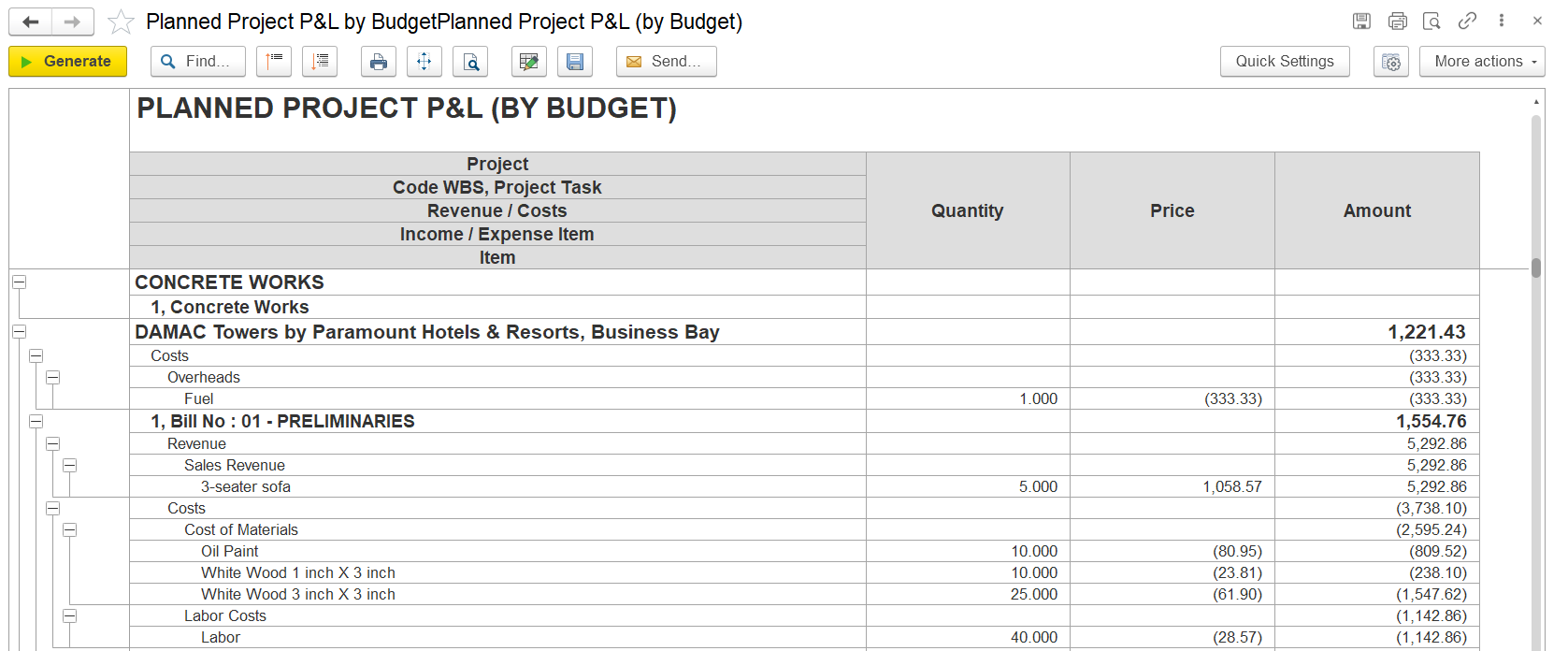
This report provides a detailed breakdown of the planned profit and loss for a project, available in two versions: By Budget and By Estimate. The By Budget version is based on budgeted figures . It displays both from the project budget document generated in the Project Costing module, while the By Estimate version uses planned figures from Project Estimates. Both outline revenue and cost components across various project tasks, allowing supporting effective monitoring of expected financial outcomes., budgeting, and cost control during project planning.
Structure
Organized in a hierarchical format, including:
Project Level: Displays the overall project.
Budget Sections / Cost Heads: Major divisions of the project budget.
Project Tasks / WBS Items: Detailed breakdown of work packages under each section.
Revenue and Cost Breakdown:
Revenue: Shows budgeted income for each task.
Costs: Includes budgeted expenses such as equipment, labor, subcontractors, overheads, and transportation.
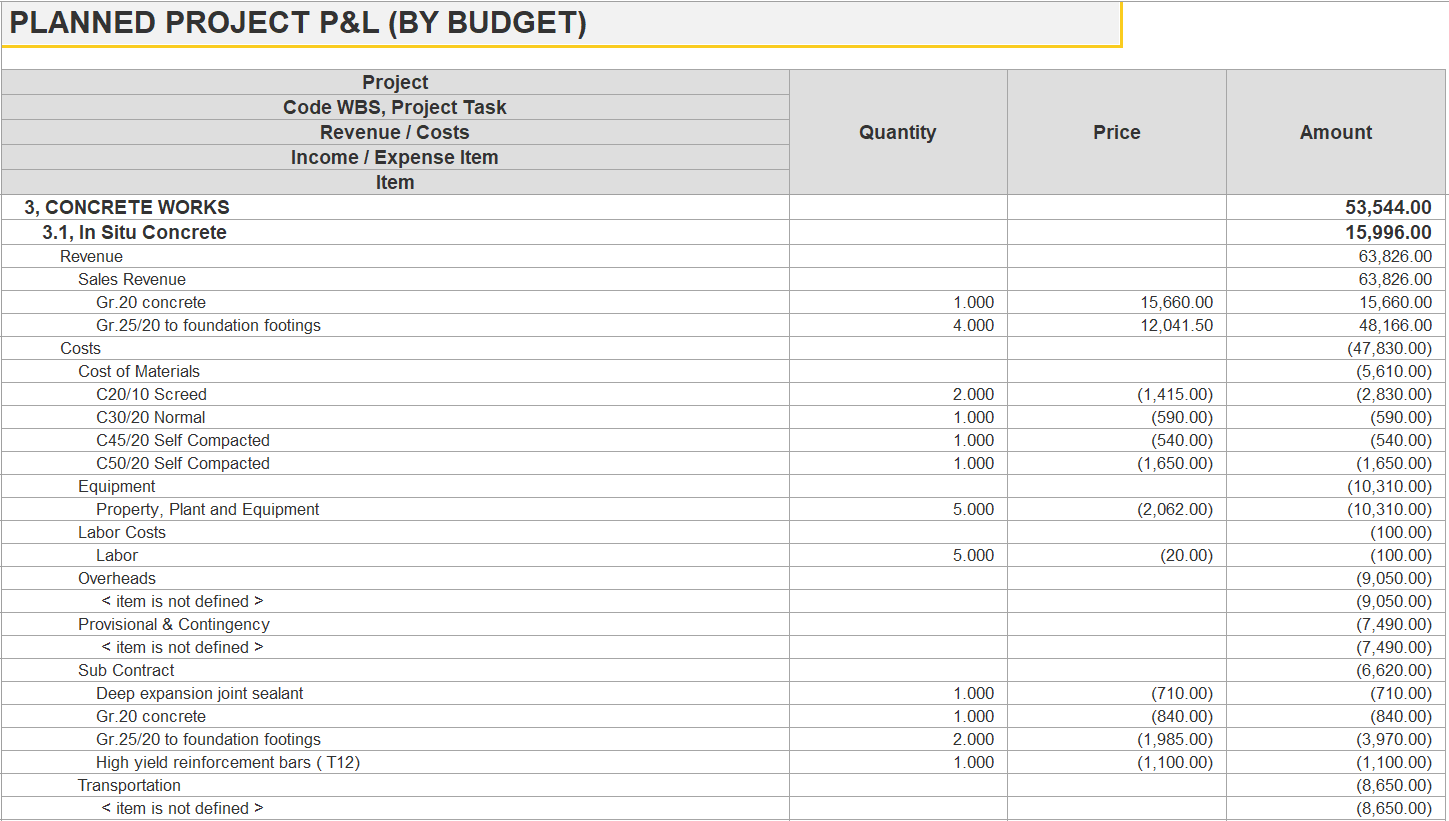
Each line includes columns for quantity, unit price, and total amount.
The report is structured hierarchically, starting from the project name, followed by major budget sections (e.g., Preliminaries, Crete Works), and further divided into specific work items or WBS elements. Each task displays budgeted revenue and associated cost components such as equipment, labor, overheads, subcontracting, and transportation.
Revenue entries show quantities, unit prices, and total amounts, while cost entries are listed as negative values, reflecting planned expenditures. Totals are provided per section and summarized at the project level to reflect the net planned result.
Filters on the right panel allow the user to refine the output by entity, project, project task, company, or income/expense item. The “Generate” button refreshes the report according to selected parameters. The “Without templates” option ensures that only actual planned data is shown, excluding template-based assumptions.
This report is essential for project managers and finance teams to assess expected margins, plan resources efficiently, and support informed decision-making throughout the project lifecycle.
Planned Project P & L (By Estimates)
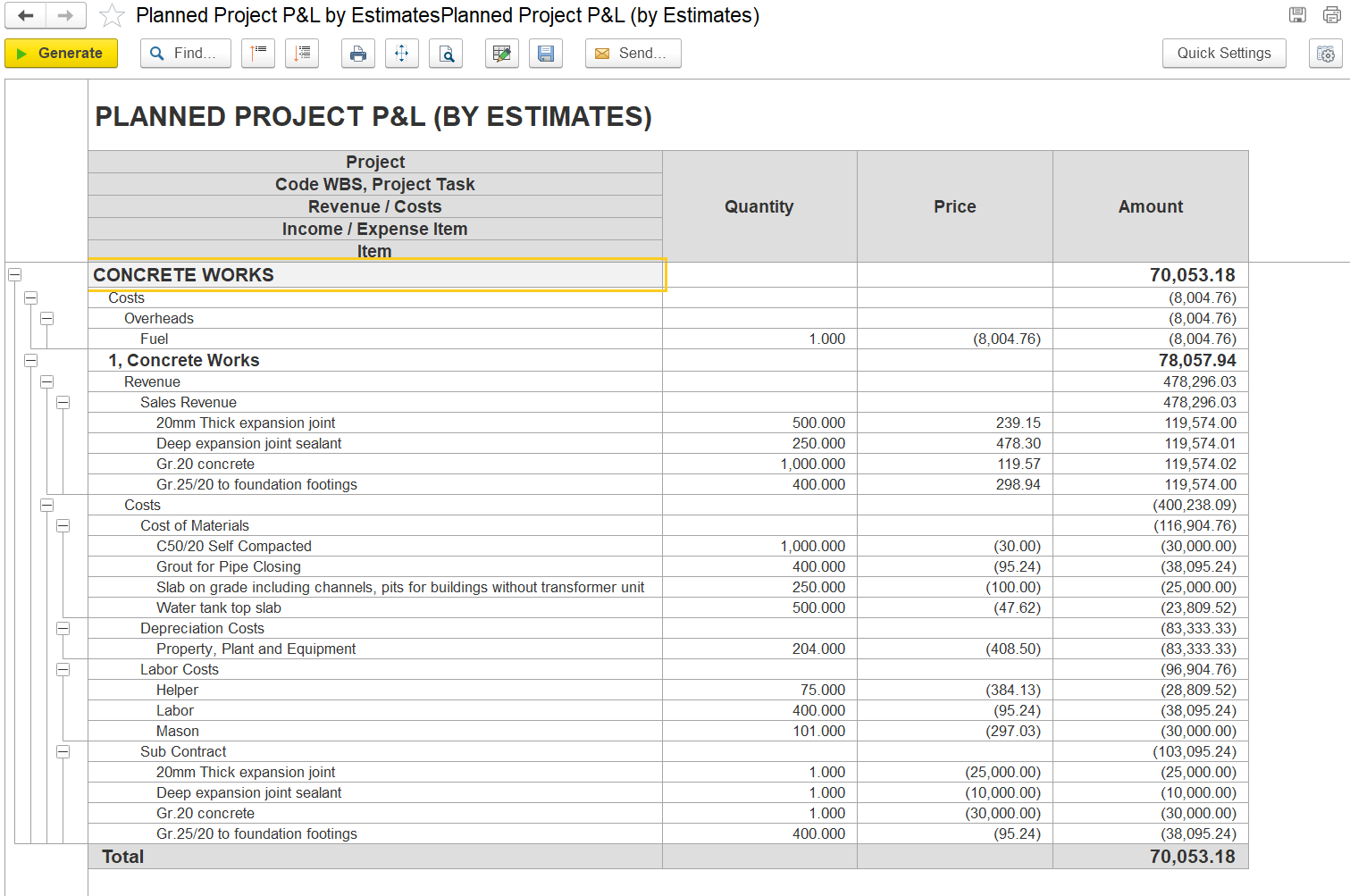
This report provides a detailed financial overview of a project based on planned (estimated) figures. It outlines both expected revenues and associated costs categorized by task and item level, supporting effective budgeting and cost control during project planning.
Field Descriptions
...

Generate - Executes the report based on the selected filters or parameters.
Find- Allows users to search within the report for specific text or values.
Collapse/Expand Groups – Show or hide grouped sections in the report.
Print Button- Opens a print preview or directly sends the report to a printer.
Fit to Screen/Zoom Button- Adjusts the report layout to fit within the screen or zooms into specific areas.
Search Button (Magnifying Glass)- An alternate or advanced search tool for locating specific records or entries.
Edit Mode Button- Enables editing mode for the report or screen.
Save disk- Allows formatting or exporting options to be saved to the desk as per required formats, such as to Excel or PDF.
Send- Used to email or forward the report directly to another user or contact.
Project It refers to the name of the specific project phase or task being reported on, such as Concrete Works.
The Code WBS, Project Task indicates the Work Breakdown Structure (WBS) code and associated task
...
.
Revenue / Costs
...
Identifies whether the entry is classified as an income (revenue) or an expense (cost)
...
.
Income / Expense Item describes the particular income-generating element or cost-incurring component relevant to the task.
Item lists the detailed subcomponents or specific line items that contribute to the overall revenue or cost calculation.
Quantity, Price, Amount: These columns provide the measurement (e.g., m², unit), estimated unit price, and total calculated value (Quantity × Price).
Revenue entries show quantities, unit prices, and total amounts, while cost entries are listed as negative values, reflecting planned expenditures. Totals are provided per section and summarized at the project level to reflect the net planned result.
The report (By Estimate) shows the estimated profit for the "Concrete Works" task by comparing planned revenue and costs. Revenue totals AED 478,296.03, while total costs amount to AED 400,238.09 (including materials, labor, depreciation, and subcontracting), resulting in a planned profit of of AED 70,053.18. The report helps assess profitability and cost distribution for better project planning.
Filters and parameters
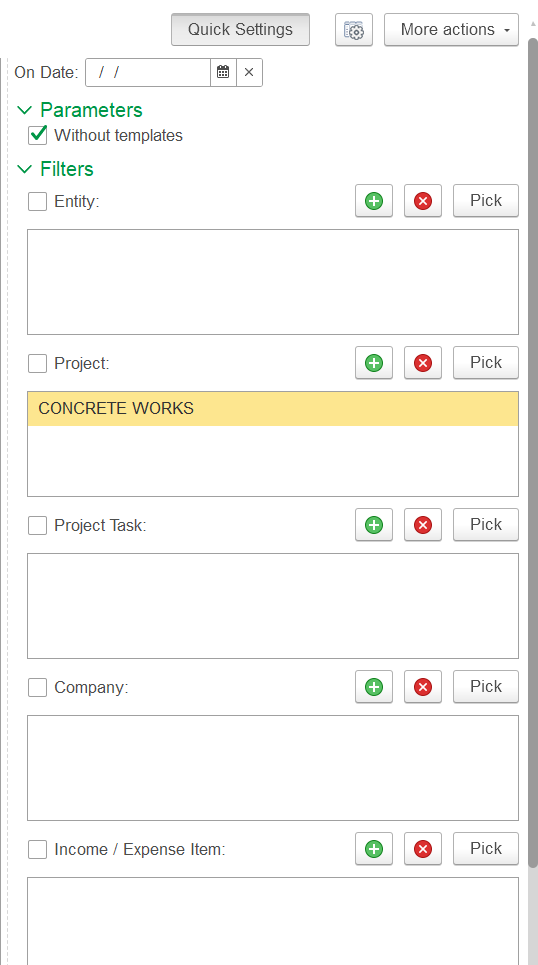
Without templates – When checked, it excludes template data, showing only actual project data.
Entity – Selects a specific legal entity or company unit; the report shows data for the chosen entity only.
Project – Filters the report to a selected project
Project Task – Filters by specific tasks or sub-tasks within the project; if empty, all tasks are included.
Company- filter displays data for one selected company.
The income/expense item filter narrows data to certain costs or revenues.