Problem: The 1C license fails regularly
...
Solution:Check your computer according to the following list of possible reasons, in the end of the list there is a table with recommendations for each case.
Note that you will need the help of your system administrator or other IT person -specialist to check hardwares hardware and software in your IT-infrastructure.
...
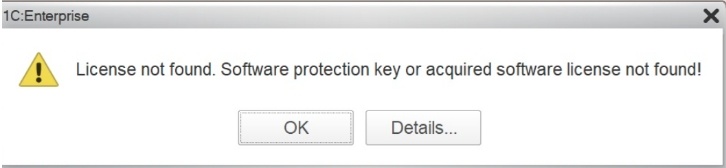
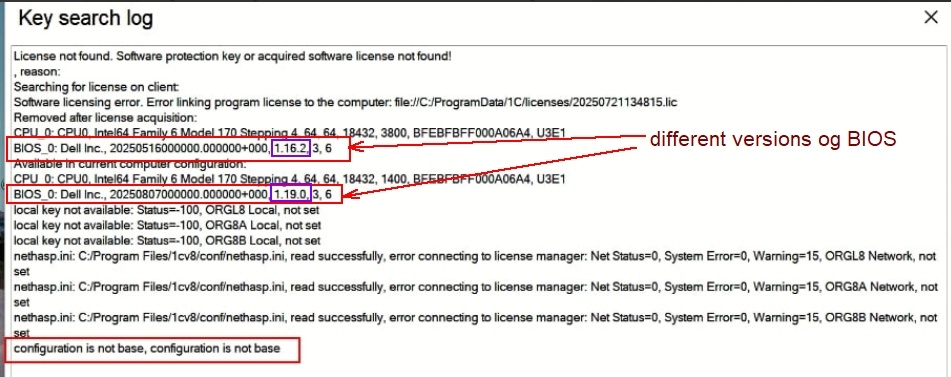
Below is an example of an error message that a program may generate (License not found. Software protection key or acquired software license not found ; Error linking program license to the computer; Software licensing error):
...
Here’s the list of reasons why a 1C license may stop working:
1. Technical reasons (hardware-related)
1.1. Replacing or failing hard drive / SSD where the license was installed.
1.2.Replacing the motherboard (hardware ID changes and the license becomes invalid).
1.3. Replacing the network card (MAC address is used for license identification).
1.4. Changing hardware configuration (e.g., adding/removing network interfaces or virtual adapters).
1.5. Using virtual machine images — cloning a VM breaks the hardware binding.
1.6. BIOS reset or motherboard firmware update.
1.7. Hardware failures (bad sectors, power surges, disk controller errors) damaging license data.
...
Reason | License Type Affected | How to Fix / Recommended Action |
Hard drive / SSD replaced or failed | Software | Restore from backup if possible; contact FirstBit Hotline for recovery assistancereactivate by 1С license vendor. |
Motherboard replaced | Software | Request reactivation from FirstBit Hotline 1С license vendor (hardware ID changed) |
Network card replaced (MAC changed) | Software / Network | Reactivate or reissue license; contact FirstBit Hotline for recovery assistance. |
BIOS reset / firmware update | Software | Ensure BIOS settings are stable; contact FirstBit Hotline for license recovery assistanceReactivate license. |
Hardware failure (bad sectors, controller issues) | Software / Hardware key | Repair hardware and contact FirstBit Hotline for license recovery assistancereactivate by 1С license vendor. |
Cloned or moved virtual machine | Software | Reactivate after moving VM (contact FirstBit Hotline for license recovery assistance.; avoid cloning licensed VMs. |
OS reinstallation or upgrade | Software | Reactivate license (contact FirstBit Hotline for license recovery assistance); keep backup of license files. |
System restored from backup without license data | Software | Restore license folder or reactivate manually. |
Registry cleaning tools removed license keys | Software | Exclude 1C registry keys from cleaners; Reactivate license (contact FirstBit Hotline for license recovery assistance). |
License folder deleted (C:\ProgramData\1C\licenses) | Software | Restore from backup or reactivate (contact FirstBit Hotline for license recovery assistance). |
Failed 1C update damaged license | Software | Reinstall 1C platform; reactivate license (contact FirstBit Hotline for license recovery assistance). |
Antivirus or Defender blocked license files | Software / Network | Add exclusions to antivirus; restore and reactivate license (contact FirstBit Hotline for license recovery assistance)/. |
1C service or RLM server not running | Network | Restart services; check ports and firewall |
Lost connection to license server | Network | Check RLM server status and network connectivity |
Server IP changed | Network | Update client connection settings |
Firewall / antivirus blocking license ports | Network | Add exceptions for RLM ports |
Multiple license servers in same network | Network | Leave only one active RLM server |
License service crashed or failed to start | Network / Software | Restart service or server; check logs |
Dongle physically damaged | Hardware | Replace key; request duplicate from 1С license vendor |
Drivers not installed or corrupted | Hardware | Reinstall HASP/Sentinel drivers |
Key inserted into different USB port / not detected | Hardware | Plug into same port; check Device Manager |
USB instability or unsafe removal | Hardware | Use stable USB port; never unplug during use |
VM moved to another host | Software | Reactivate license (contact FirstBit Hotline for license recovery assistance) ; avoid moving without reactivation. |
Changed hypervisor (e.g., VMware → VirtualBox) | Software | Reactivate (contact FirstBit Hotline for license recovery assistance); avoid changing virtualization platform |
Changed VM UUID / MAC address | Software | Restore original parameters or reactivate license (contact FirstBit Hotline for license recovery assistance). |
Snapshot rollback without license state | Software | Reactivate after rollback (contact FirstBitHotline for license recovery assistance). |
License expired (temporary license) | All | Renew or purchase permanent license (contact FirstBit Hotline for license recovery assistance). |
Incorrect system date/time | Software / Network | Correct time settings; restart 1C services |
Activation failed (server unavailable) | All | Retry later or contact FirstBit Hotline for license recovery assistance. |
Administrator deleted license data | All | Restore from backup or reactivate (contact FirstBit Hotline for license recovery assistance). |
Corrupted registry or system files | Software | Run system repair and reactivate license (contact FirstBit Hotline for license recovery assistance). |
8. Important Notes:
8.1. Сontact FirstBit Hotline if you need assistance with requesting reactivation key from 1С license vendor.
8.2. Please note that changing technical parameters of computers is the responsibility of Customer system administrators and is not related to FirstBit software.
Thanks for being a Firstbit Customer!
...