...
Send - Emails or forward the report to another user or contact.

Report Fields
Project
...
- Description of the project
Code WBS, Project Task
...
- Project tasks broken down by Work Breakdown Structure (WBS)
...
Item- Column lists detailed components of each task
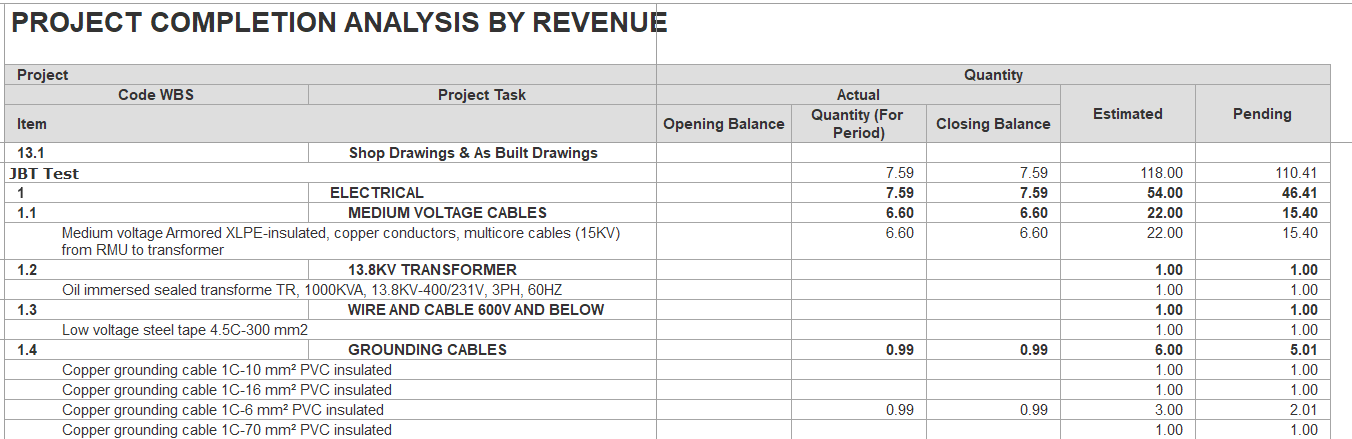
Quantity (Opening, For Period, Closing, Estimated, Pending) measures the physical progress of work.
Opening Balance - cumulative quantity completed up to the start of the period.
For Period - Quantity of work done in the current reporting period.
Closing Balance - cumulative quantity completed to date (Opening + For Period).
Estimated - planned quantity for the task.
Pending - remaining quantity to be executed (Estimated - Closing).
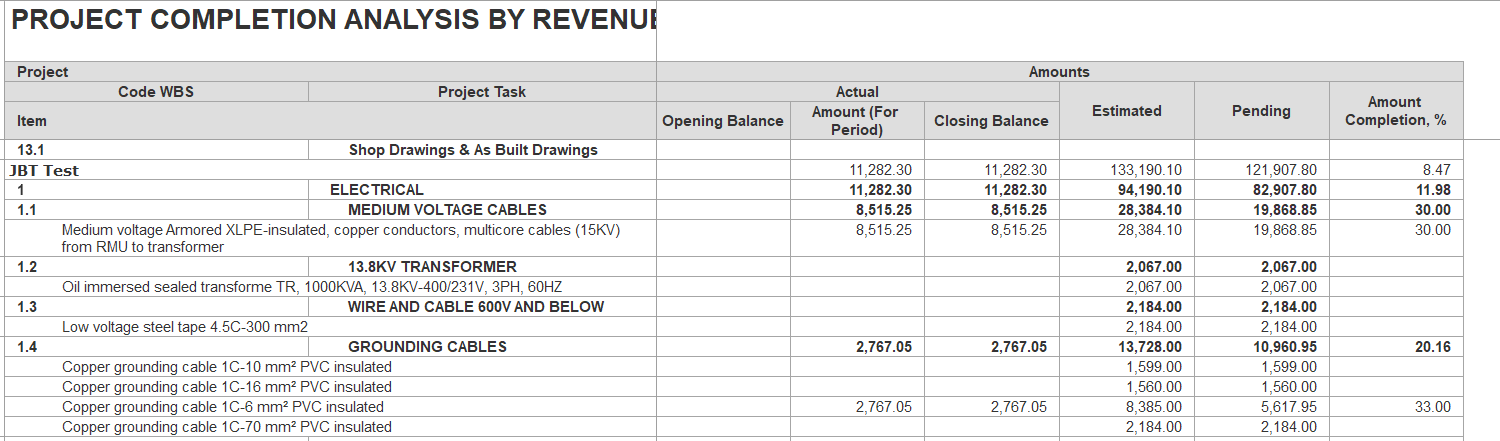
Amounts reflect the financial side of progress.
Opening Balance - cumulative recognized amounts from prior periods.
For Period - value recorded in the current reporting period.
Closing Balance - cumulative recognized value (Opening Balance + Actual Amount (For Period)).
Estimated - planned value for the task.
Pending - balance not yet recognized (Estimated - Closing).
Amount Completion % shows
...
how much of the work or revenue has been completed, expressed as a percentage.
Formula
...
-
Amount Completion % = (Closing Balance ÷ Estimated Amount) × 100
Example-
Closing Balance = 11,282.30
Estimated Amount = 133,190.10
Calculation- (11,282.30 ÷ 133,190.10) × 100 = 8.47%
Meaning of Values-
Positive % - Work progress has been made and recognized.
0% -
...
No progress has been recorded.
Negative % -
...
Reversals or corrections reduce recognized
...
progress below zero.
Filter
Period:- Define the report’s start and end dates; only data within this range will be included.
Without templates:- Excludes entries that are based on templates.
Show amounts:- When enabled, displays amount columns and details; otherwise, only quantity columns are shown.
Entity:- Optionally select specific entities.
Project: - Restricts the report to the chosen projectsselected projects.
Item:- filter based on a specific item.
...