...
- Project- Linked project used to auto-fill WBS, service lines, and cost tracking information in the certificate.
Company - The company for whom the payment certificate is created
- Contract- Sets the rules for billing and certification based on the chosen contract type.
It includes project details, involved parties, currency, and rules for VAT, retention, advances, and pricing.
Also, it automatically pulls in BOQ/Estimation items and fills in Terms & Conditions.
...
- Apply Retention withholds a portion of the payment as specified by the contract, and Ret. VAT at Retention Invoice applies VAT to the retention amount when the retention invoice is issued. Both options are set based on the selected contract and are non-editable from the document.
- Entity - The legal party that issues the payment certificate
- Basis - Indicates whether the certificate was generated from a Payment Application or created manually for progress.
- The Progress / Advance selector allows the user to define the purpose of the certificate.
...
b) Advance- Used to acknowledge advance payments or prepayments under the contract. Selecting this option displays an Advanced tab for requesting or recording such payments instead of actual work completed. It does not create
...
- Comment- Field for entering additional notes, remarks, or instructions.
...
- Code- BOQ or WBS code identifying each work item in the project structure.
- Item / Content- Description of the service or work item selected for certification.
- UOM (Unit of Measure)- Unit in which the work is measured (e.g., Pcs, Mtr, m³).
- Price- Unit rate as per the contract or BOQ.
- Estimate Qty / Amount- Planned quantity and total planned amount for the item (Quantity × Price).
- Payment Application Issued - Qty / Amount / %- Shows the quantity, value, and progress percentage already applied for in submitted payment applications.
- Payment Certificate - Previous Qty / Amount / %- Displays the quantity, value, and percentage that were certified in earlier Payment Certificates.
- Current%- Progress is certified in this document.
- Cumulative%- Total progress certified to date.
- Quantity- Quantity of work certified in this certificate.
- Amount (Excl. VAT)- Certified amount excluding VAT.
- VAT%- VAT rate applied (e.g., 5%).
- Retention Total (before retention)- Total Certified amount before applying retention.
- Retention% / Amount- Retention percentage and corresponding deduction.
- VAT Amount- VAT value calculated on the amount.
- Total- Final amount payable (including VAT, after retention).
- Comment- Optional notes for clarification or remarks.
...
Summary Tab
At the bottom of the Project Structure tab, a financial summary shows key certified values for the certificate. This table is linked to the selected parent line, so it only shows related details.
- Project Details- Displays the associated project, WBS, and task from the related service lines.
- Item and UOM Info- Shows the service item, content/description, and unit of measure.
- BOQ Values- Displays the baseline BOQ estimated amount and quantity for reference.
- Progress Snapshot- Compares progress in percentage and quantity across different periods.
- Application vs Certified- Highlights how much has been applied (from PA) vs how much has been certified (in this document).
- Cumulative Recalculation- Automatically adjusts certified values if the linked Payment Application changes.
- Purpose- Allows users to see the cumulative and current period metrics in one place, enabling audit, control, and reconciliation across documents.
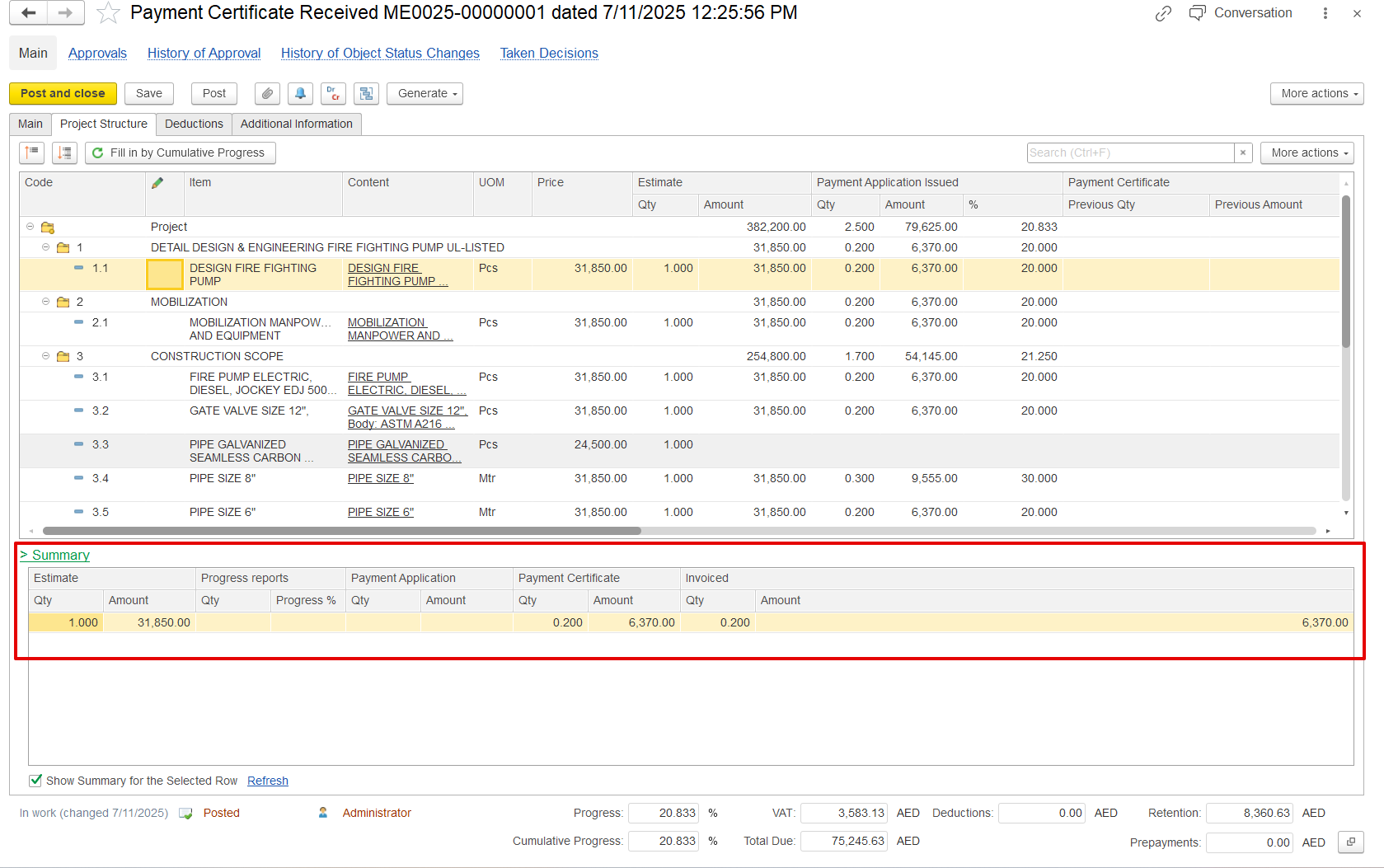 Summary section provides a quick view of all key billing values.
Estimate Qty & Amount-The original planned quantity and value from the contract or BOQ, used as the baseline.
Progress Report Qty & %-The completed work so far, recorded through progress reports, shown as quantity or percentage.
Payment Application Qty & Amount-The portion of progress that the contractor is claiming in the current payment application. This may differ from the actual reported progress.
Payment Certificate Qty & Amount-The portion of the claim that has been approved by the consultant/client after review.
Invoiced Qty & Amount-The value already invoiced to the client, usually matching the certified amount, unless invoices are split or postponed.
If the "Show Summary for the Selected Row" option is enabled, the summary table is a subordinate table that filters and displays details related to the selected parent row.
Deduction tab
Used to list amounts deducted from the total payable value of a payment certificate or invoice.
...