...
The described behavior is part of the standard payment status calculation logic implemented in both configurations.
Overview
The Payment Indicator is a visual status displayed in different areas of calculated automatically by the system where documents are shown. It allows users to quickly identify the settlement status of a document.
The Payment Indicator is calculated automatically by the system and is not based solely on the outstanding Accounts Receivable balance.
The system determines the payment status by comparing values calculated from:
- Sales register
- Accounts Receivable register
...
.
The calculation logic depends on the document type.
For example:
- for Invoice and Invoice Received, the indicator is calculated by comparing values from the Sales and Accounts Receivable registers;
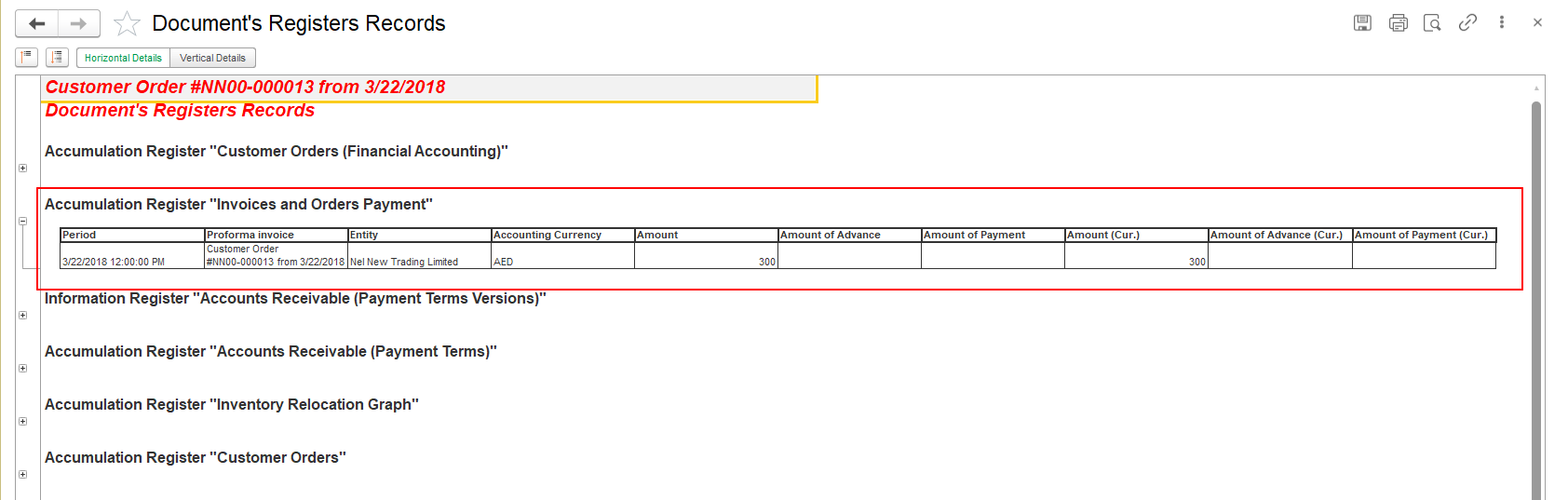
- for Customer Order and Purchase Order, the indicator is calculated using the Invoices and Orders Payment accumulation register.
Based on these calculations, the system displays the appropriate Payment Indicator for the document.
As a result, reducing the outstanding balance does not always change the Payment Indicator.
...
Payment Status Calculation Logic
The Payment Indicator is calculated differently depending on the document type.
Invoice and Invoice Received
For
...
Invoice and Invoice Received documents, the system calculates the following values.
Sales Amount
Calculated based on the turnover in the Sales register.
Accounts Receivable Amount
Calculated based on the remaining balance in the Accounts Receivable register.
The
...
Payment Indicator is determined by comparing these calculated values according to the implemented algorithm.
Therefore,
...
for Invoices, the Payment Indicator reflects the relationship between register values rather than simply the remaining
...
outstanding balance.
Customer Order and Purchase Order
For Customer Order and Purchase Order documents, the Payment Indicator is calculated using the Invoices and Orders Payment register.
The system compares the following values:
- Amount (the total amount of the Order);
- Amount of Advance;
- Amount of Payment.
Based on the comparison of these values, the system automatically determines the Payment Indicator displayed for the Order.
Unlike Invoices, the Payment Indicator for Orders is not based on the Sales and Accounts Receivable registers. Instead, it reflects the payment progress recorded in the Invoices and Orders Payment accumulation register.

Filtering by Payment Indicator
...
To verify the actual outstanding balance, always refer to the Accounts Receivable information and settlement calculations rather than relying solely on the payment indicator.
Summary
The
...
Payment Indicator is calculated using different algorithms depending on the document type.
- For Invoice and Invoice Received, the system compares values from the Sales and Accounts Receivable registers.
- For Customer Order and Purchase Order, the system compares the Order Amount with the registered Advance and Payment amounts stored in the Invoices and Orders Payment register.
Therefore:
- a standard Credit Note created without the Advance option may reduce the outstanding balance without changing the Payment Indicator;
- a Credit Note created with the Advance option may update the Payment Indicator;
- the Payment Indicator is intended for visual reference only and cannot be used for filtering or searching documents;
- actual debt analysis should always be performed using the Balance column, settlement reports, and Accounts Receivable balances;
- this behavior is standard and is implemented identically in both FirstBIT configurations.
...
- .
Thank you for being FirstBIT Customer!