...
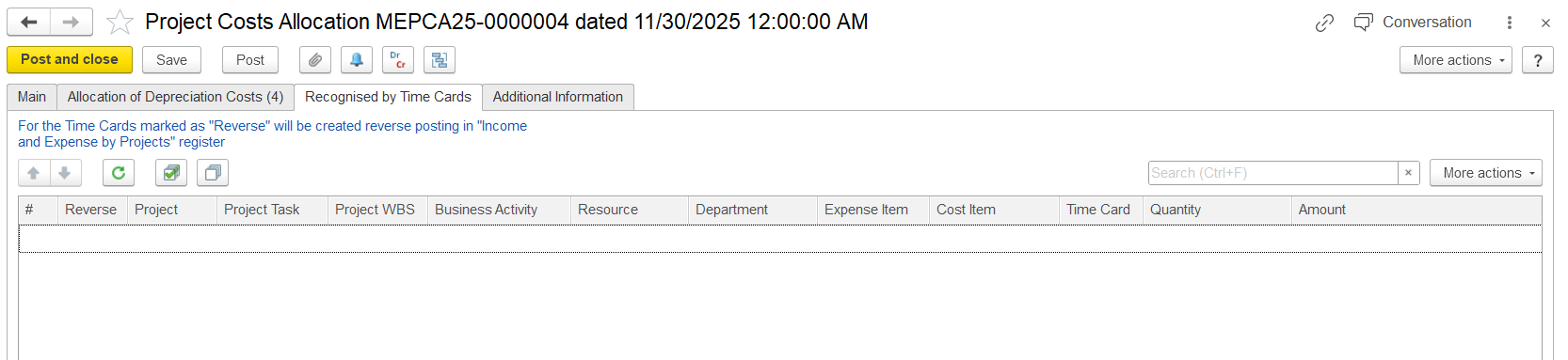
Only time cards within the selected accounting period are considered for allocation, ensuring depreciation costs are posted to the correct period.
- Reverse - Indicates Checkbox showing whether the depreciation allocation entry is will be reversed.
- Project - Project associated with the depreciation cost allocation.
- Project Task - Specific project task receiving the depreciation allocation.
- Project WBS - Work Breakdown Structure level used for detailed depreciation tracking/ Project Task / Project WBS - Shows where the original depreciation cost was allocated.
- Business Activity - Business activity linked operation related to the depreciation allocationcost.
- Resource - Fixed asset or equipment generating linked to the reversed depreciation cost.Department - Department responsible for the asset or depreciation expense.
- Expense Item - Type of expense recognized, such as asset depreciation./ Cost Item - Cost category under which the depreciation expense is recordedDefines the type and category of depreciation cost being reversed.
- Time Card - Reference to the original asset usage or operational time record used for allocation.
- Quantity / Amount - Number of usage hours or units recorded for the asset.Amount - Monetary value of the allocated depreciation cost in transaction currencyUsage hours and depreciation cost amount being reversed from the project ledger.
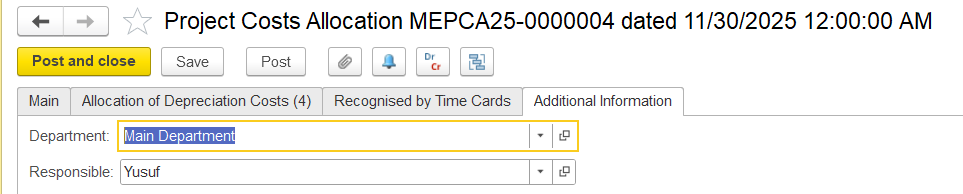
Additional Information tab
On this tab, users can enter optional details for the document, such as the department and the person responsible for the allocation. No fields are mandatory.