...
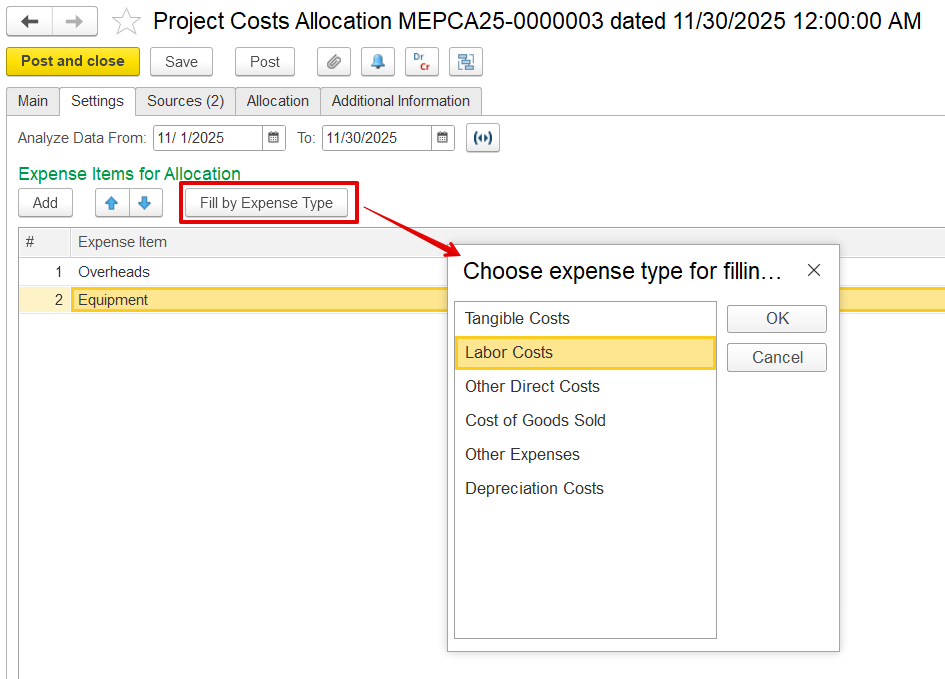
- Expense Item for allocation - Specify the expense type for allocation.
- Add - It is used to add the expense item manually from all existing expense items.
- Fill by Expense Type - This option lets users select an expense type and automatically populate the list of relevant expenses for allocation based on the chosen category.
Source Tab
This tab lists shows all expenses available expenses for allocation, based on the settings defined in using the configurations from the Settings tab. Click the Fill button to populate the data based on those settings.
- Allocate - Checkbox to include this row in allocation. Only checked rows will be distributed to projects.
- Resource - The type of resources, such as Employee or Fixed asset.
- Cost Item - The type of cost recorded
- Expense Item - Expense type
- Business Activity / Department - business activity or department of the sources added.
- Unassigned Amount - The portion of the expense that has not yet been allocated to any project.
- Unassigned Amount (National Currency) - Same as above, shown in the local currency.
...
The Allocation tab is used to assign direct costs to projects. It is divided into two sections:
- Upper pane : Displays - Displays the selected allocation sources
- Lower pane : Shows - Shows the resulting allocations
...