...
- attributes description as usual
- Resource type
- Allocate cost
- Hired resources.
Main Tab
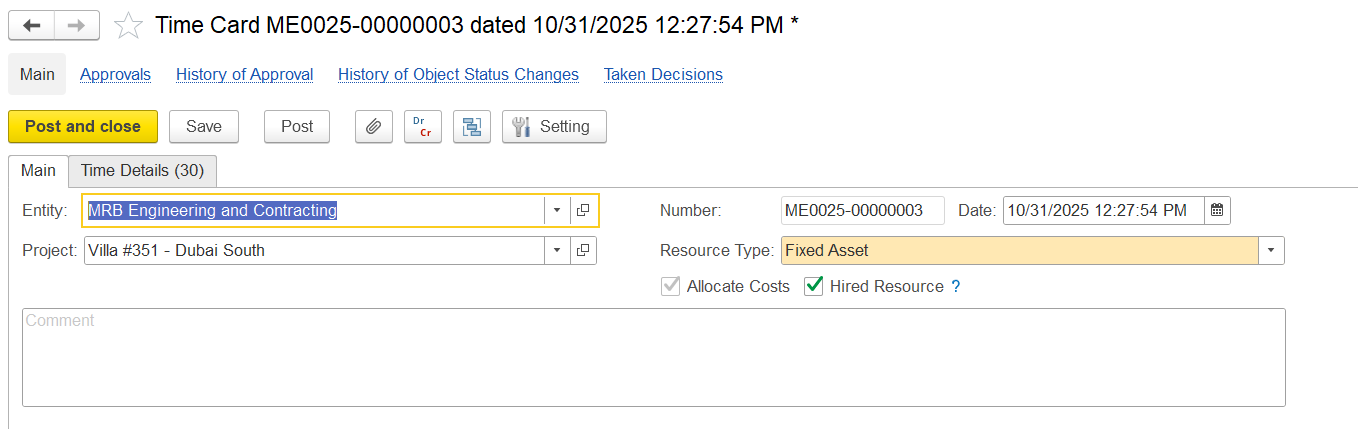
The Main tab is used to record the general information about the Time card.
- Entity – The entity recording the time of the work.
- Project – the project for the time entry; can apply to the whole card or each line based on settings
- Resource type – the type of resource (employee, equipment, subcontractor, or others); this affects how the cost is calculated
- Allocate cost – decides if the time should create a project cost
- checked – cost will be calculated and added to the project
- unchecked – time is only recorded, no cost added
- Hired resources – shows if the resource is external (hired) or internal
Time details table
- columns description as usual.
- non working chaeck box.
- Time types.
- Hours and rates (if allocate cost).
- Fill table button
- by entity
- by department (if department in the header)
- by resource allocation (period planning and long term both planning will be considered while filling)
- fill rates button (if hired rates are taken from PO, if not hired → from Project item pricing or from resource rates register based on settings)
- by resource (rate searched by exact employee or fixed assets)
- by item (rate is searched by item (position or FA category).
- Set date button.
...