...
This tab shows the basic details needed to identify and manage the invoice.
Company - The The company from which this invoice has been whom the invoice was received.
Contract - Refers to the contract related to the service.
Recognize expenses in the Payment Application received - This field becomes enabled if it was activated at the start of the workflow, typically moving from Subcontractor Agreement → Payment Application Received → Payment Certificate Issued → Invoice Received.
Apply Retention - Enables retention deduction based on the agreement settings.
Ret. VAT at Retention Invoice - Indicates that VAT on retention will be accounted for when retention is invoiced.
Subcontractor Agreement - References the subcontractor agreement under which this invoice was processed.
Project - Links the invoice to a specific project for cost tracking.
Transaction Type - Defines the nature of the transaction: Receipt from Vendor for subcontractor invoices.
Basis - The document from which this invoice is generated is typically a Payment Certificate Issued.
Warehouse - Optional, used only when materials are involved (not applicable for services).
Regular / Progressive - Defines the invoicing method:
- Regular - Used for one-time or standard service invoices not linked to cumulative progress.
- Progressive - Used for ongoing subcontractor works where the invoice is based on certified progress or cumulative quantities.
Comment - Free-text field for additional notes or internal references.
...
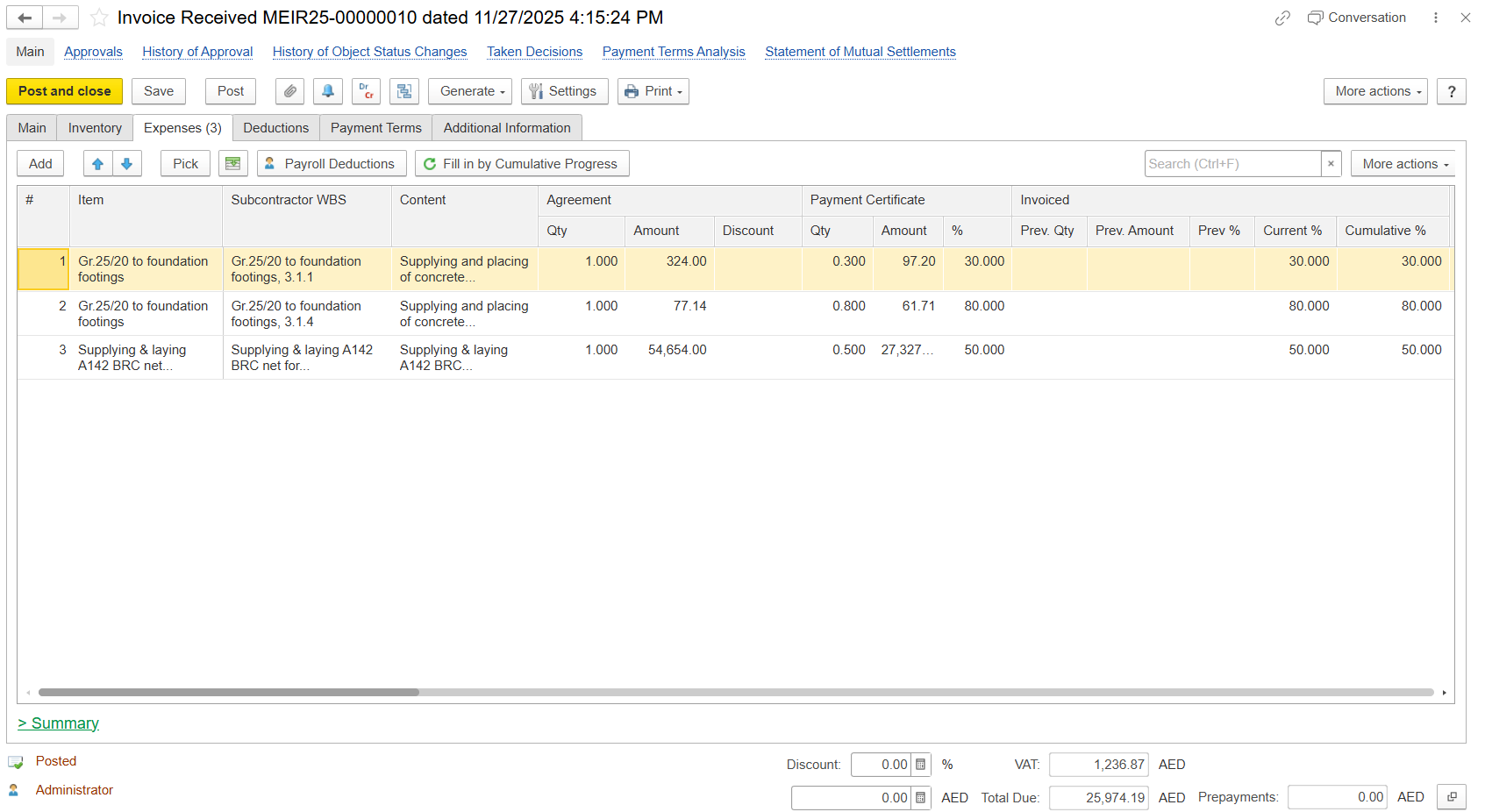
- Item - Specific work or service line
- Subcontractor WBS - Project WBS Optional code linked to the subcontractor’s scope of work.identify work as defined by the subcontractor
- Content - Description of work or service performed; must align with the contract scope.
- Agreement
- Qty - Agreed quantity of work or service.
- Amount - Total contractual value = Agreement Quantity × Unit Price.
- Discount - Discount applied to the agreed amount, if any.
- Payment Certificate
- Qty - Quantity certified for the current payment period.
- Amount - Certified amount corresponding to the approved quantity.
- % - Percentage of the total agreement certified for payment.
- Invoiced
- Previous Qty - Quantity invoiced in previous payment periods.
- Previous Amount - Amount invoiced in previous payment periods.
- Previous % - Percentage invoiced up to the last period.
- Current % - Percentage invoiced in the current period.
- Cumulative % - Total invoiced percentage to date.
- Qty - Current claimed quantity of work or service.
- UOM - Unit of Measure (e.g., m², m³, pcs).
- Price - Unit rate applied for invoicing.
- Discount - Value of discount applied to the line item.
- Discount % - Percentage of discount applied to the line item.
- Amount - Net value after applying discounts.
- VAT% - The applicable VAT rate for the line item.
- Total (Before Retention) - Gross total before applying retention deduction.
- Retention % - Percentage of retention applied as per contract terms.
- Retention Period (Days) - Duration after which the retained amount can be released.
- Retention - Amount withheld from the total payable for quality or performance assurance.
- Retention VAT - VAT calculated on the retained amount.
- VAT Amount - Total VAT applied to the invoice value.
...
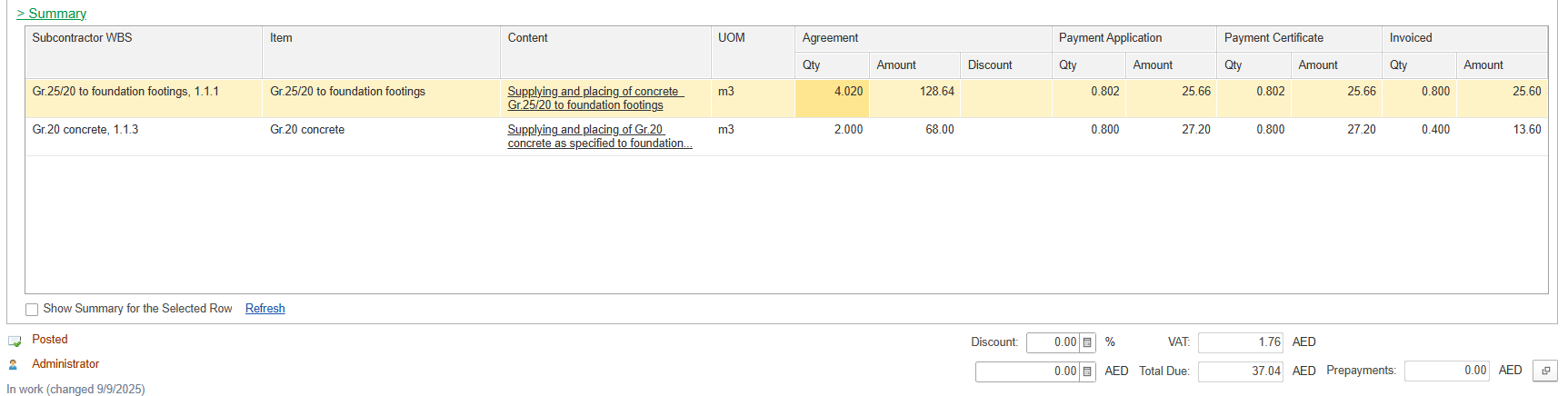
Subcontractor WBS - Work Breakdown Structure for subcontractor scope
Item - Specific work/service line
Content - Description of work/service performed
UOM - Unit of Measure
Agreement
- Quantity - Original contract quantity
- Amount - Contractual value
- Discount - Any discount applied to the contract amount
Payment Application
- Qty - Quantity applied in Payment Application
- Amount - Value applied in Payment Application
Payment Certificate
- Qty - Certified quantity for invoicing
- Amount - Certified amount for invoicing
Invoiced
- Qty - Total invoiced quantity to date
- Amount - Total invoiced value to date
Deductions Tab
The Deduction tab is used to record amounts that reduce the invoice total.
...