...
As a result of Supplier Tendering, a selected supplier from the tender comparison is finalized as a subcontractor.
Main Tab
...
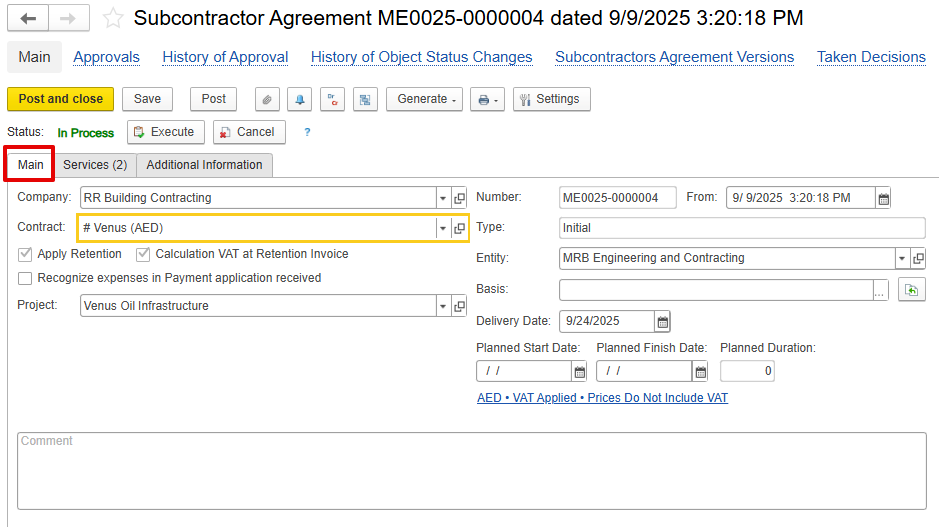
Contract
...
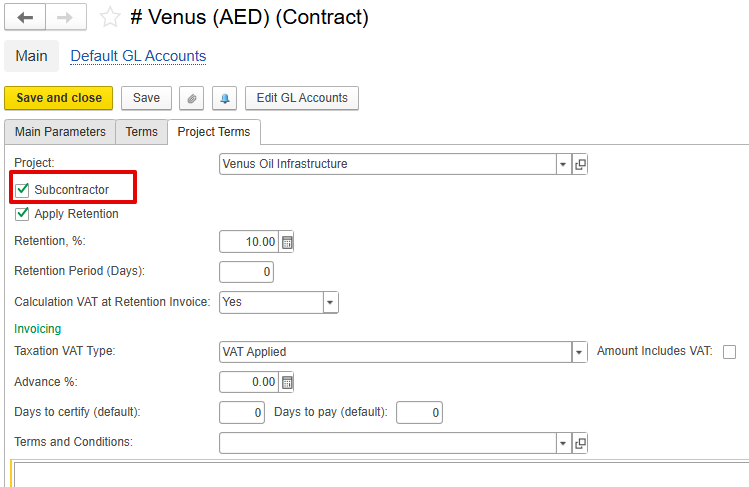
-Main project or contract to which the subcontractor's work relates. The contract must be marked as Subcontractor.
VAT and Retention settings from the contract will be automatically applied to the Subcontractor Agreement.
Entity – -The executing company (used in multi-entity environments).company
Type – -Defines document purpose:
Initial – -Original agreement.
Revision – -Updated version of the agreement before execution.
Variation – -Additional scope or changes to the approved agreement.
Project – -Links subcontracted work to a specific project.
Apply Retention – -Activates retention logic as per contractual terms.
Calculation VAT at Retention Invoice – -Ensures VAT is applied at the time of retention release.
Recognize expenses in Payment Application received – -If enabled, expenses are recorded when the subcontractor submits a payment claim rather than at invoice stage.
...
Delivery / Planned Start / Finish Dates – -Define execution timeline.
Basis – -Reference for scope or cost basis.
Comments – -Internal remarks or notes.
...
This tab defines detailed work items agreed with the subcontractor.
Subcontractor WBS – -Optional code to identify work as defined by the subcontractor.
Item – -Description of BOQ or service item.
Content – -Detailed description of work.
Quantity / UOM / Price – -Defines the scope and rate of work.
Discount / VAT / Total – -Price and tax calculation.
Project Task / Project WBS – -Links subcontracted work with internal project structure for cost and progress tracking.
...
Add / Pick / Pick by Project Budget – -Import items directly from the project BOQ.
Purchasing Prices – Pulls prices Purchasing Prices-Pull prices from historical purchase data for reference.
...
Update Cost Control Table – -Refreshes the table to display current budget and order amounts.
Displays values as of the document date by:
Project / Project WBS / Expense Item
Budget Amount – -Approved amount in project budget.
Orders and Agreements (Current / Other Remaining) – -Committed amounts including current SA and previous documents.
Materials Delivered – -Value of work delivered or goods received.
Actual Expense – -Recognized or posted cost.
...