...
Company Name - The company for whom the invoice is being created
Contract - The contract linked to the invoice
Entity Name - The entity issuing the invoice
Basis Document - The document on which the invoice is based
Project - The project related to the invoice
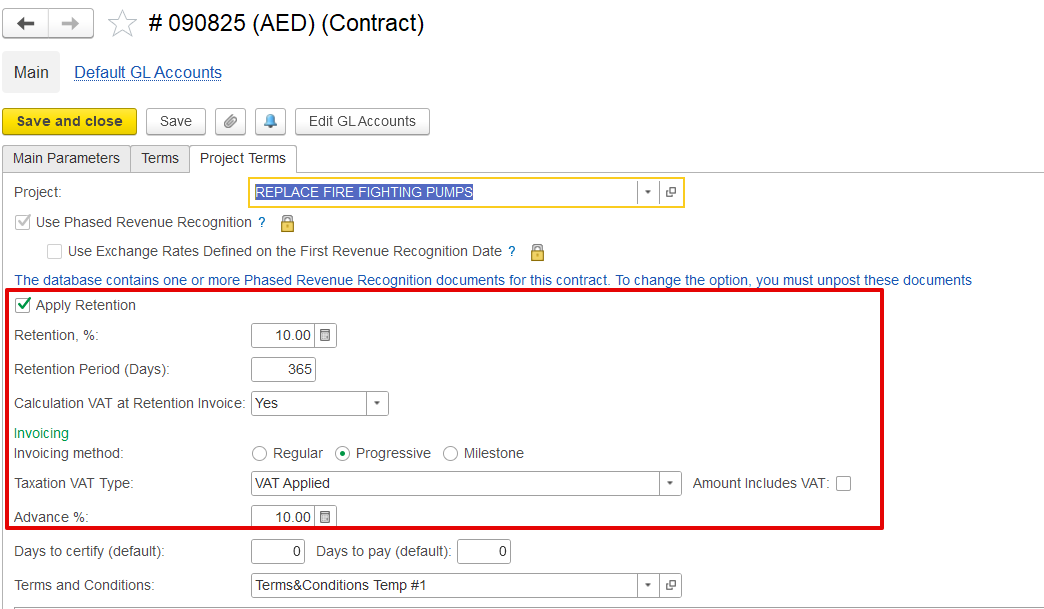
- Invoice Type - Indicates whether the invoice is Progressive, Advance, Milestone, or Standard. Set automatically based on the contract. This setup ensures that invoicing aligns with the contract’s agreed terms, including how retention, VAT on retention, and advance payments are handled.
- Auto Advance Offset – - When this option is enabled, the system automatically deducts a portion of the advance payment from the invoice. It works by checking how much of the project is being billed and applies the same percentage to the advance, so the correct amount is deducted without manual intervention.
...
Inventory and services tab
- Item/content: - Describes the specific item being billed, such as a fire pump, gate valve, or pipe
- Estimated Quantity, Amount, and Discount: - Displays the planned quantity and agreed unit price as per the contract. Also includes any item-level discount applied before calculating VAT and retention.
- Certified Quantity, Amount, and Percentage: - Indicates the quantity that has been reviewed and approved for invoicing by the consultant or client, based on the issued Payment Certificate. Also shows the certified value expressed as a percentage of the estimated amount.
- Invoiced (Previous):- Shows the amount that has been billed in earlier invoicing periods.
- Current Percentage:- Represents the percentage of estimated values included in the current invoice.
- Cumulative Percentage:- Indicates the overall completed progress, including both current and previously invoiced values.
- Unit of Measure (UOM):- Defines the unit used for measurement, such as meters or pieces, depending on the item.
...
This section gives an overview using several checks and approvals:-
- Project WBS / Task:- Refers to a specific part of the project, like a task or milestone.
- Estimated Quantity and Amount:- Displays the planned quantity and associated cost as per the contract.
- Discount:- Any discount given for this item, as agreed.
- Progress Report:- Shows the actual work done, reported by the site engineer or supervisor.
- Payment Application:- The amount the contractor wants to bill, based on the completed work.
- Payment Certificate:- The amount approved by the client or consultant after reviewing the progress.
- Invoiced Quantity and Amount:- The final approved quantity and value that will appear in the invoice.
...
The typical process for an advance invoice is: - Payment Application → Payment Certificate → Invoice for Advance → Payment Received.
...