...
- Project - Connects the document to the project and its data.
- Company - The client or contracting company.
- Contract - Taken from the project; includes pricing, retention, and advanced details.
- Entity - Legal entity creating the document.
- Basis - Shows where the data comes from, like a Project Progress Report.
- Retention - Indicates if retention rules are used.
- Ret. VAT at Retention Invoice – - If enabled, VAT will be included as part of the retention amount and calculated when the retention invoice is issued.
- Currency and Price Settings - Taken from the contract.
- Comment - Optional note or remark.
...
Select the invoice type to determine the applicable structure:
Progressive – - Used for billing based on completed work or project milestones.
Advance – - Used for requesting upfront payments before work begins.
...
It displays the list of project tasks with their hierarchy, estimates, progress, and billing details for preparing the payment application.
- Code – - WBS code showing task hierarchy.
- Project Task – - Name or description of the Task.
- Estimate Qty/Amount – - Planned quantity and planned total contract amount for the task.
- Progress Reports Qty/% – - Actual completed quantity and percentage based on progress updates.
- Payment Application Previous Qty/Amount/% - This is the amount posted in previous Payment applications.
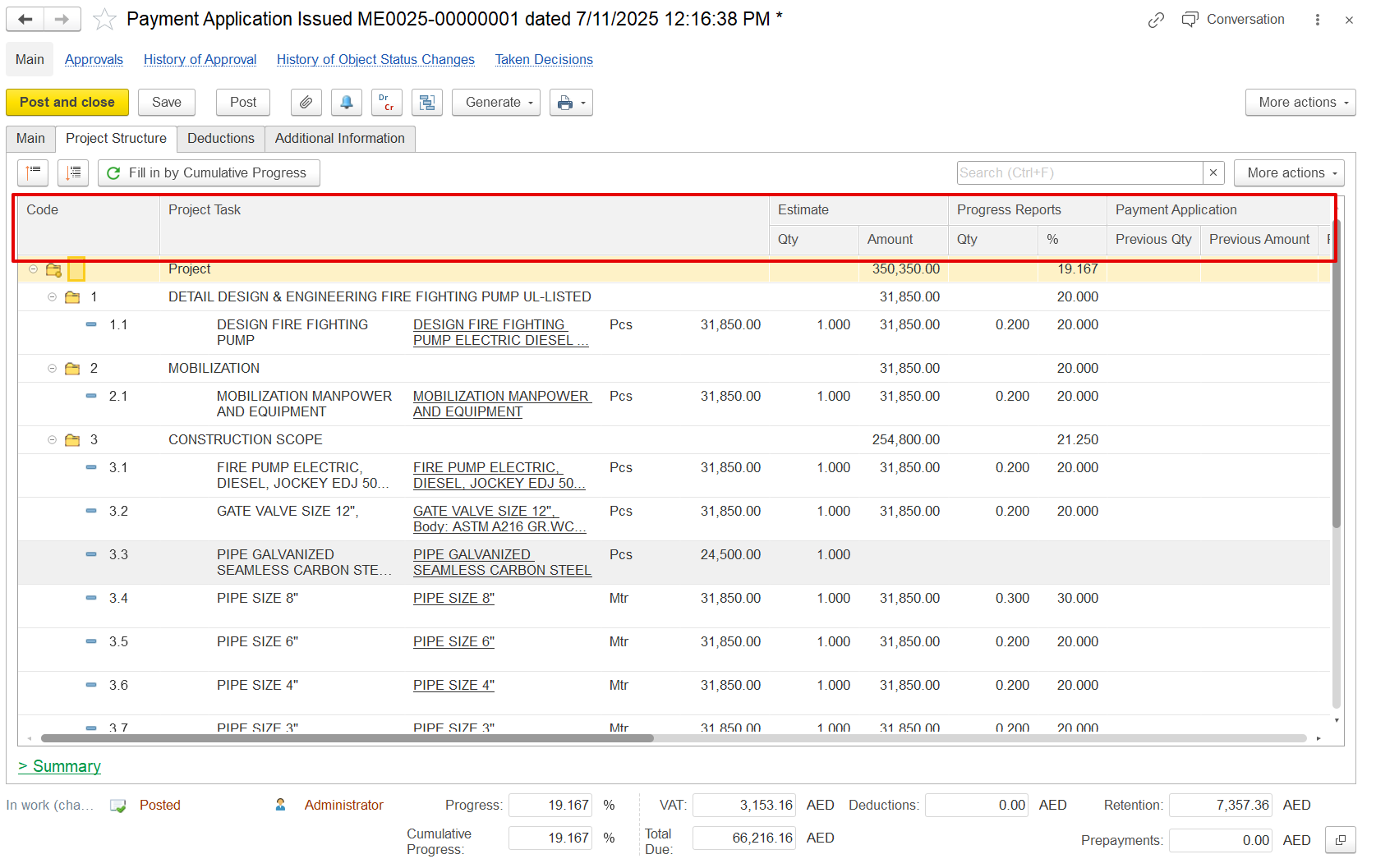
- Previous Qty / Amount / % – Work quantities, values, and percentages previously billed.
- Current% % – Current% - Percentage of work being claimed in this application.
- Cumulative% – - Total completed percentage, including current and previous.
- Quantity – - Calculated from cumulative % and estimate.
- Amount (Excl. VAT) – - Net value of current application before VAT.
- VAT% – - Tax rate applied (e.g., 5%).
- Retention Total / % / Retention – - Gross amount before retention, retention rate, and retained amount.
- Retention VAT – - VAT applied on the retained amount.
- VAT Amount – - VAT on the payable amount after retention.
- Total – - Final payable amount (amount minus retention plus VAT).
- Comment – - Any additional remarks, if needed.
...
At the bottom of the Project Structure tab, a financial summary section provides a quick view of all key billing values for the current period.
- Estimate Qty & Amount – - The original planned quantity and value from the contract or BOQ, used as the baseline.
- Progress Report Qty & % – - The completed work so far, shown as quantity or %, based on the latest progress report (can be negative if reversed).
- Payment Application Qty & Amount – - The portion of progress being claimed for payment in this application may differ from the actual progress.
- Payment Certificate Qty & Amount – - The approved amount from the client or consultant after reviewing the payment application.
- Invoiced Qty & Amount – - The value already invoiced, typically matching the certified amount unless split or deferred.
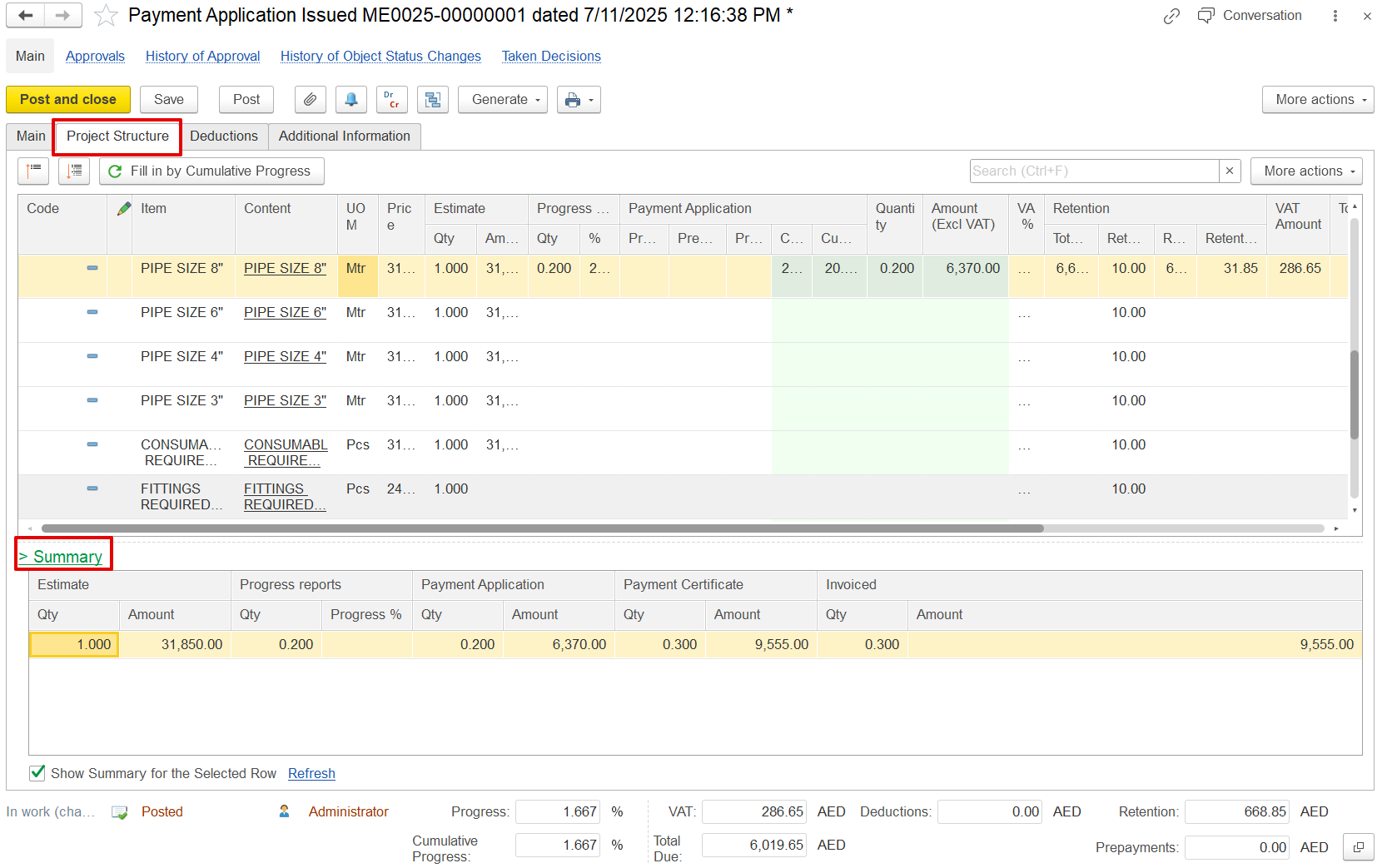
If the "Show Summary for the Selected Row" option is enabled, the summary table will display details based on the parent line that was selected.
Deduction tab
The Deductions tab is used to apply reductions like penalties or back charges before calculating the net payable amount.
...
This tab is for adding extra details related to the project
Bank Account – - Client bank details
Additional Data for Print – - Custom reference info for printed forms.
Terms and Conditions – - Standard clauses or payment terms.
...