...
- Advance Invoice- Issued to request upfront payment before work begins.
- Payment Received- Records client payment and marks it for offsetting.
- Project Progress Report - captures the percentage of work completed on-site.
- Payment Application Issued - Drafts the billing claim based on reported progress.
- Payment Certificate Received - Approves and certifies the amount to be invoiced.
- Progressive Invoice - An invoice issued based on the certified amount, with any applicable advance deductions
- Credit Note - Used to adjust or correct previous invoices.
Retention
It Retention is a percentage (e.g., 10%) of the invoiced amount that is temporarily withheld to ensure the contractor completes the project properly and resolves any defects that may ariseproper project completion and defect resolution. In FirstBit, retention can be applied per invoice or only at the project project’s end, based depending on contract settings. The retained amount is not lost; it is posted separately to Retention Receivables and can be claimed later.
VAT on Retention can be treated in two ways:
Before Retention – VAT is calculated on the full invoice amount, including the retained portion. This means the client pays VAT upfront, even if part of the payment is held back.
After Retention – VAT is calculated on the net amount (after retention deduction). Later, when the retention is claimed, VAT is again calculated on the retained amount through a separate document. This method aligns VAT with actual payments.
Once the project is complete and the retention period Details on how VAT is treated on retention are specified in the contract attributes.
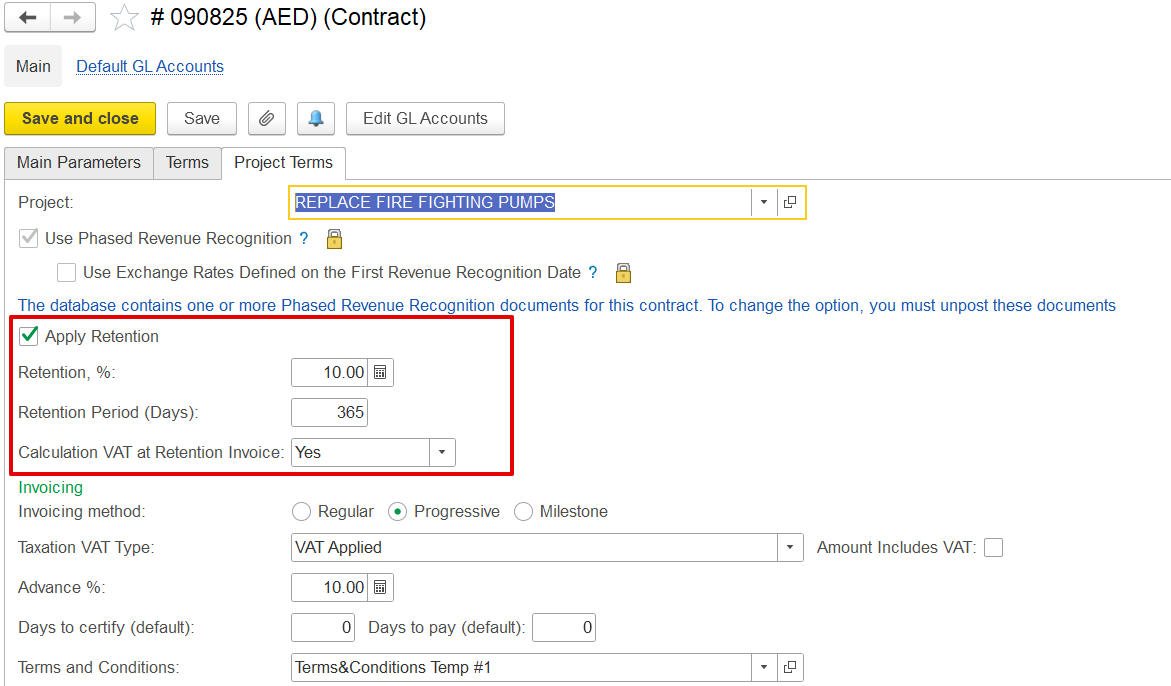
At project completion and after the retention period ends (e.g., 12 months) ends, the retained amount is returned. The system automatically fetches the retrieves original retention and VAT details. A Tax Invoice can then be is generated to finalize the retention release and ensure VAT compliance.
...