...
- Purpose of the document.
- how to create.
- main tab attributes. Explain about invoice type and link with contract.
- Can be used as Advance invoice. explain option to generate advance received payments (not detailed. just mention Bank Receipt, cash or cheque can be generated to receive advance amount)
- Table: how to fill, columns description.
- Actual advance offset.
- Summary linked table.
- Print forms (Progressive Tax invoice and summary)
A Progressive Invoice is used to bill customers based on actual project progress, such as completed milestones, percentage of work done, or certified quantities. Its purpose is to align billing with the value of work completed, ensuring accurate, stage-wise invoicing in long-term or contract-based projects. It also accounts for advances, deductions, and retention as per contract terms.
How to create
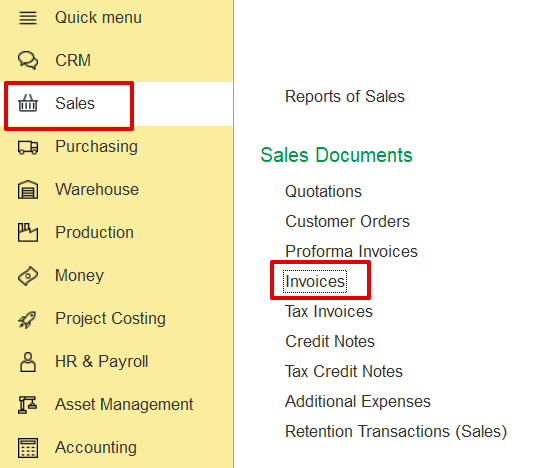
Sales → Sales Documents → Invoices → Create
Then, choose the Progressive Invoice type from the available invoice types.
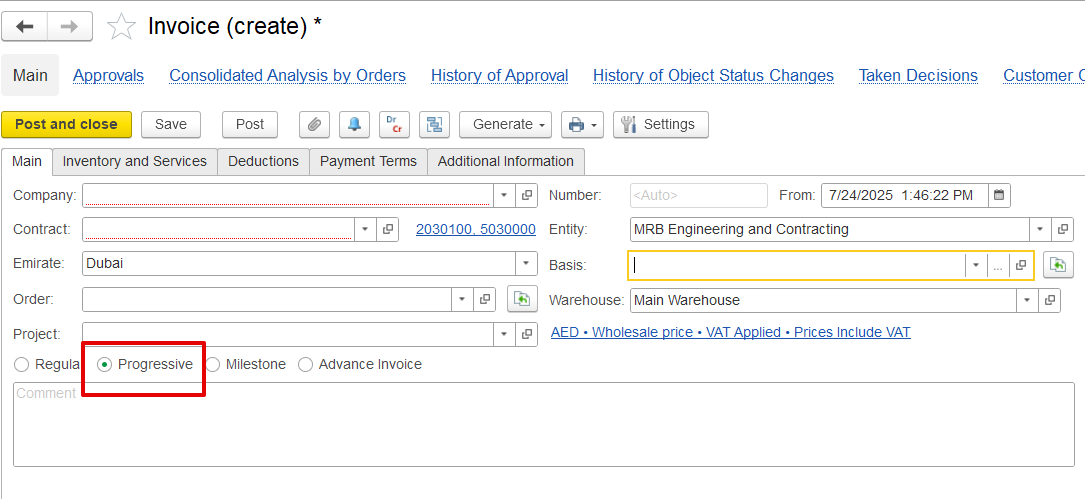
If generated from a document such as a Payment Certificate, the invoice form will have the progressive settings already applied by default. It will automatically populate key fields such as the project, contract, and period, and retrieve related data from the linked Payment Application and Certificate, streamlining the creation process.