...
- Purpose of the document.
- how to create.
- main tab attributes. explain about contract settings.
- Can be used for issuing Advance invoice.
- Table: how to fill, columns description.
- Advance offset button and form. for planned advance offset.
- Summary linked table
- Print forms (detailed and summary)
The Payment Application is used to request payment for completed project works, based on the progress achieved. It links project estimation, actual progress, and contractual terms to calculate the amount due for the current period. This document forms the basis for generating the Payment Certificate and eventually the Progressive Invoice.
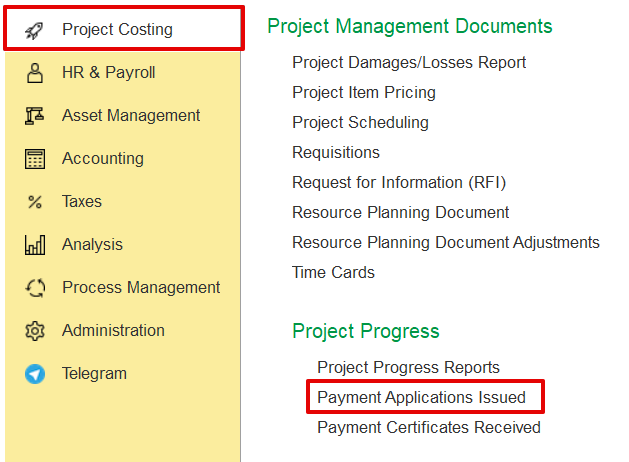
It can be accessed from
Project costing→ Project Progress Reports → Payment Application
...
How to Create the Document
Click Create and select the required Project from the list.
Based on the project and contract setup, the system will automatically populate all fields based on the selected project structure and the linked contract settings. The user can make changes to adjust progress percentages, retention settings, discounts, amounts, VAT, or other applicable data. Users can optionally fill in the document from the Project Progress Report, and if existing values are present, the system will ask for confirmation before overriding.
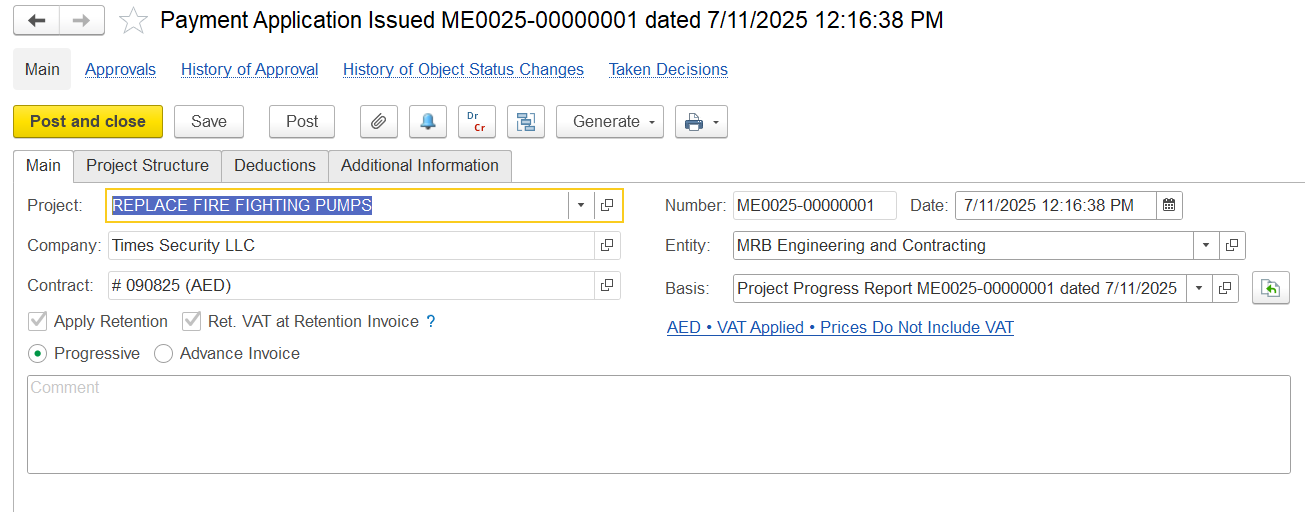
Project – Links to the project structure and related data.
Company – Specifies the client or contracting company.
Contract – Pulled from the project; defines pricing, retention, and advance settings.
Entity – Indicates the executing party.
Date – Document creation date.
Number – System-generated identifier.
Basis – Source of data, e.g., Project Progress Report.
Retention – Indicates whether retention rules are applied.
Advance Applied – Shows if an advance is included or offset.
Currency and Price Settings – Fetched from contract settings.
Comment – Optional user remarks.
Author – System-logged document creator.
Responsible – Assigned user handling the document.
Progress / Advance – Select invoicing type:
Progress for milestone-based billing
Advance for upfront payment