...
2. How to Use a Project Template
The The Fill by Template feature enables the automatic population of allows the Project Estimate document based on to be automatically populated using predefined templates. These templates, stored in the database, include contain standardized revenue structures that can be applied to multiple projects to ensure uniformity and save time.
This feature is available within the project estimate document.
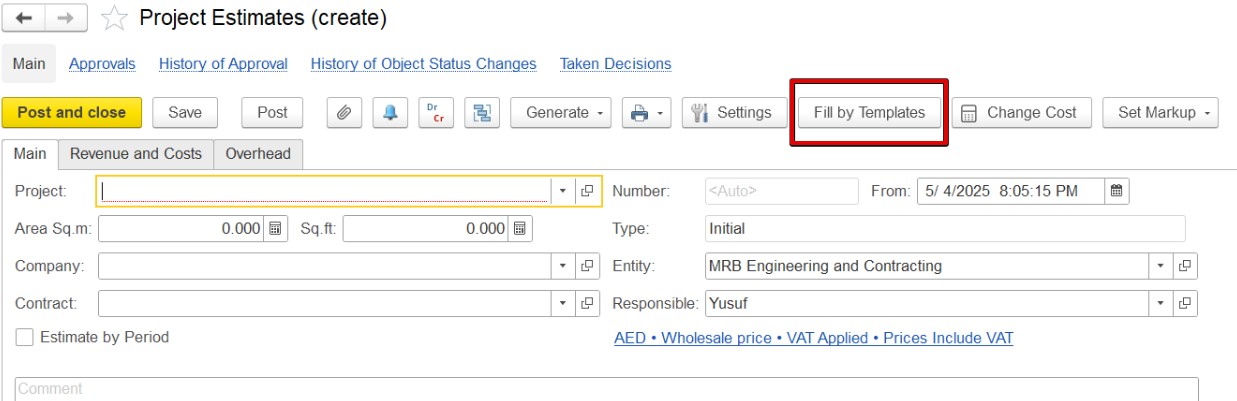
promote consistency and improve efficiency across multiple projects.
Templates are displayed according to the selected cost calculation method. For estimates where the “Cost is calculated based on revenue,” only templates with matching settings will be shown, and the same applies in the case of Independent Calculations of Costs and Revenues.
This functionality is accessible directly within the Project Estimate document.
Click on the Fill by Template option to fill in the revenue and cost tab.
...
Right Side: Shows the revenue rows from the selected template.
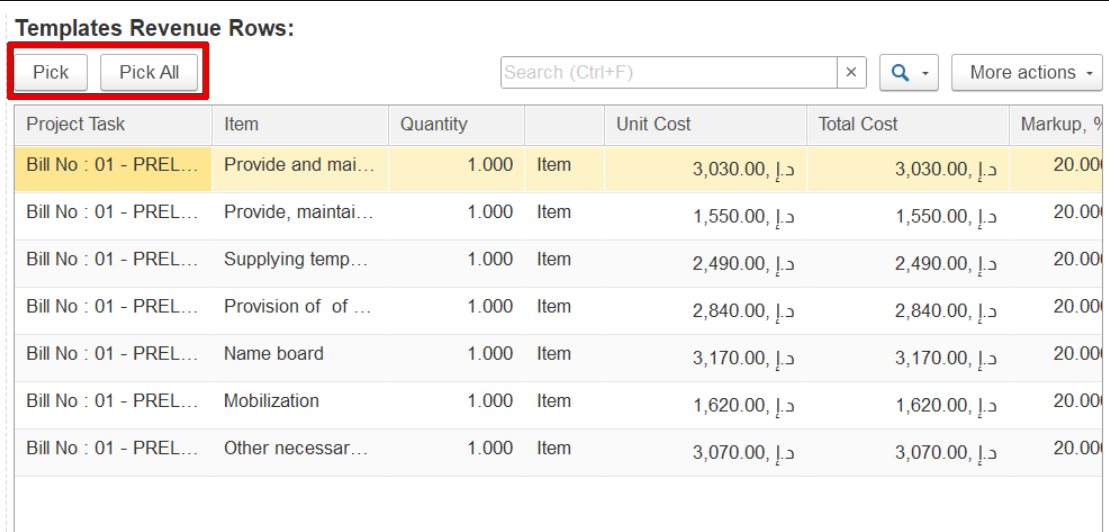
You can select a single line, multiple lines, or all lines. To add a line to your project estimate, hover over it and click Pick. The selected line will appear in the estimate table below, where quantity and markup can be adjusted. Cost, total cost, and markup amount will be calculated automatically.
...