...
Feature | Revenue-Based Calculation | Independent Calculation |
|---|---|---|
| Cost derived from revenue | Yes (markup applied) | No (costs are entered independently) |
| Revenue auto-filled based on cost | Yes | No |
| Separate handling of VAT, price, and items | Limited | Fully flexible and detailed |
| Cost and revenue linkage | Direct | No linkage (manual entry) |
...
Fill by Revenue
...
This is a button available on the Costs tab of the "Project Estimates (create)" form when the estimation method is set to "Independent Calculation of Costs and Revenues." When clicked, it automatically fills in cost estimates using the revenue figures already entered on the Revenues tab. This provides a quick way to generate initial cost values, which can then be edited manually . Useful for scenarios where cost estimates closely mirror expected revenues.The if needed. The feature is useful for maintaining consistency and saving time during project budgeting.

Refill Cost prices
The "Refill Cost Prices" button updates the price fields prices of all listed cost items in the Cost tab based on current purchasing prices. This ensures that estimates reflect the most recent known costs.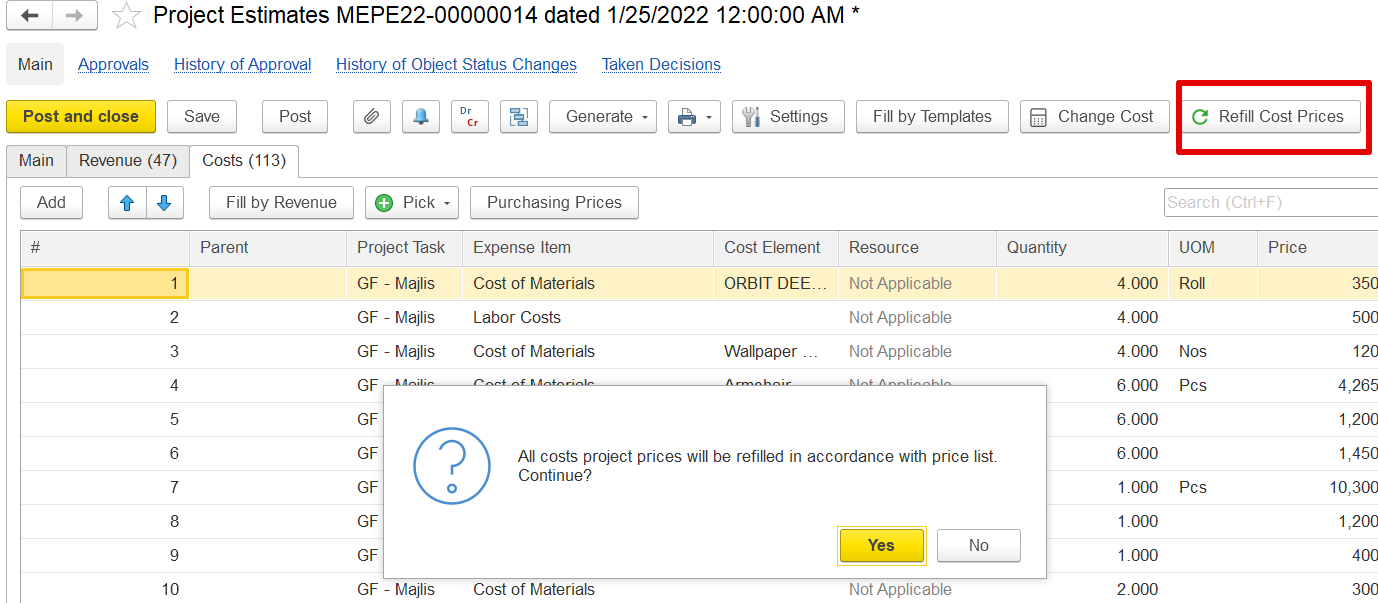 Costs tab using the system’s current price lists. When clicked, a confirmation message appears, and if confirmed, the system fetches the latest prices from the purchasing or vendor price list and replaces the values in the Price column.
This function helps ensure that the cost estimates reflect the most current and accurate pricing, based on official or approved lists. It does not change quantities, UOMs, or other fields—only the price. If a price is not available in the list, the existing value remains unchanged.
Purchasing Price
The Purchasing Price form lets users select and apply the most relevant price for an item from historical purchase data, supplier tenders, or price lists.
...